Firefox 147.0, the new monthly release of Mozilla’s web browser, is available to download.
The new version is postponed by almost one week, but introduced many exciting new features.
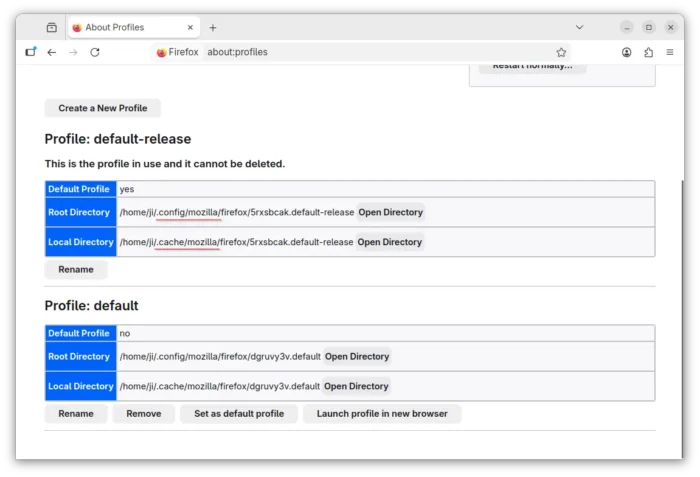
First, Firefox now support XDG based directories for Linux. Instead of ~/.mozilla, it now puts personal data (e.g., profiles) and caches in ~/.config/mozilla and ~/.cache directories, just like other Linux apps do.
The change keeps user’s home directory less cluttered and makes backup simpler. However, it does not affect existing installations, but only for fresh installs or those who manually deleted ~/.mozilla (backup first).

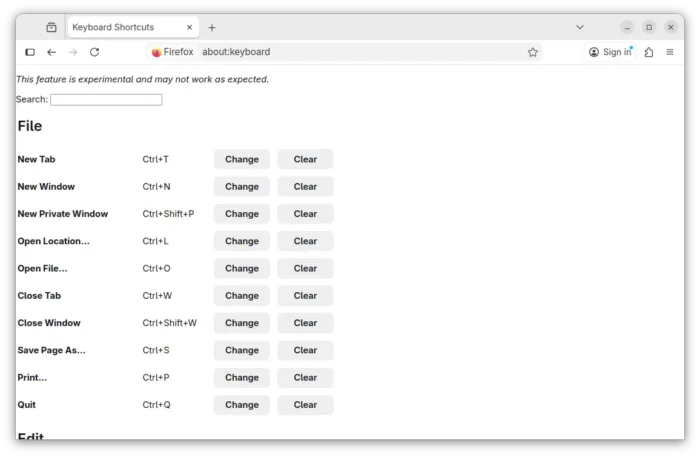
For users who prefer to use keyboard shortcuts for common actions, such as open/close tab, copy/paste, undo/redo, zoom in/out, find, and more, the new version introduced experimental feature to customize your keyboard shortcuts.
Simply type about:keyboard in address bar and hit Enter, then you’ll get the page to set custom shortcuts for all the supported actions. While, each can be disabled or reset, and all shortcuts can be reset to default via one click.

For Linux with GNOME Desktop, the browser now renders sharper on fractionally scaled displays regardless of the actual window size.
For macOS with Apple Silicon processors, WebGPU support is now enabled by default.
And for AMD GPUs, it enabled zero-copy playback for hardware-decoded video (where supported) for better playback performance.
When switching tabs, the current playing video can be set to automatically pop-out into picture-in-picture mode, so you can keep watching when the video tab is switched to background. And, when switched back, the video goes back into that tab.


Firefox 147.0 also improved security by adding Safe Browsing V5 protocol support, and migrating from Safe Browsing V4 to the local list mode of Safe Browsing V5 protocol.
The Enhanced Tracking Protection (ETP) Strict mode now has local network access restrictions enabled by default, which require users to explicitly allow public websites to access local network resources.
Other changes in the release include:
- Add support Compression Dictionaries.
- Add support for the Navigation API.
- Update Unicode ICU library to v78 with Unicode 17 and new locales.
- ES modules support in service workers.
- Add CSS Module Scripts support.
- CSS
counter-*andquotesproperties support in::markerpseudo-element. - Both CompressionStream and DecompressionStream support the Brotli format.
- Support
:active-view-transition-typeselector and associated View Transitions API. - Support for CSS anchor positioning.
- Add Storage-Access-Headers support.
- Implement CSS root-font-relative units
rcap,rch,rexandric. - Add button in JSON viewer to import the resource into Firefox Profiler.
- Ability to add/edit pseudo-element selectors in the CSS rules panel.
- Various security fixes.
Download Firefox 147.0
This post is written according to this Github release page, while the official announcement and download link will be available soon via the link below:
Or, you may select download Firefox 147.0 from this mozilla page.
Besides installing the official package from the link above, Ubuntu will update the pre-installed Firefox snap package automatically. There are also a popular Mozilla Team PPA and Flatpak package available for choices.