

KeePass password safe released new 2.61 version on Wednesday. Here are what’s new and PPA package for Ubuntu users.
KeePass 2.61 is the first release of this free open-source cross-platform password manager (through Mono) in 2026. It improved One-Time Password (OTP) support with new options and few fixes.
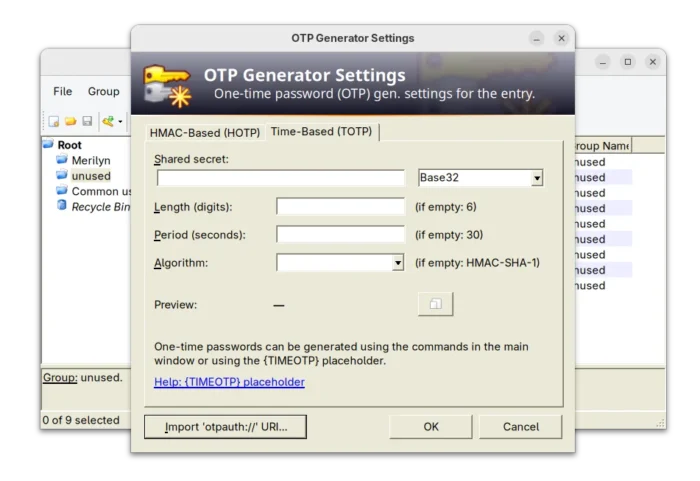
When pasting a shared secret in the one-time password generator settings dialog, it now automatically removes white-space characters (if any) if the selected encoding is Base16/Hex, Base32 or Base64.
As you see in the screenshot below, it provides a new button (after preview) allowing to copy the current one-time password to the clipboard. And, it now supports displaying settings of history entries.
{TIMEOTP} placeholder, the built-in function to create time-based one-time password (TOTP), is now classified as non-active. And, the issue editing OTP generator settings caused repeated password has been fixed.

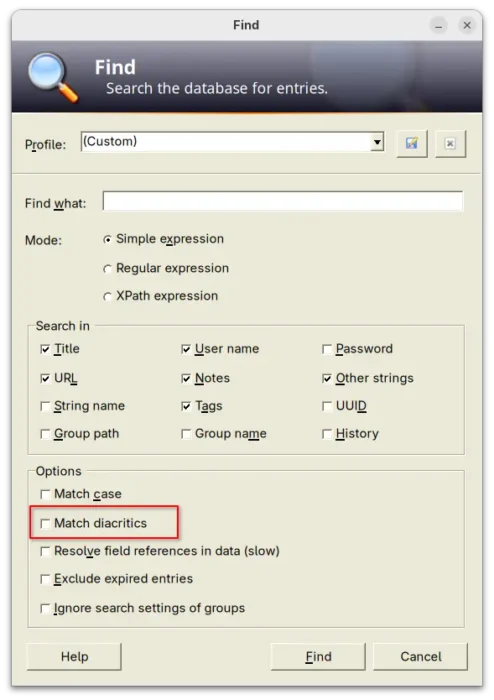
Searches in toolbar, preferences, find dialog, etc locations are now more tolerant. They are case- and diacritic-insensitive, so searching with base characters (e.g., a, e) will also match these characters with accents or marks (e.g., à, é).
And, a new ‘Match diacritics’ option is added to find dialog, though disabled by default, for those who want to treat special characters as distinct from their based characters.

The new version also updated the ‘Synchronize active database with a file/URL’ trigger action with 2 new options: ‘On error – Silent‘ and ‘On error – Continue‘, as well as support for synchronizing with multiple files/URLs at once. See HELP page for more about them.
Other changes include improvements to multi-file import/synchronization, synchronization, file transaction, and FTP connection error messages, as well as:
- Initiates the check for update before trying to open a database asynchronously.
- Ask master key, on export, as many times as (for in-correct input) when opening a database.
- Add custom option for MSI setup.
- Play UAC sound at system sound volume.
For more about KeePass 2.61 see the release note in its website.
Install KeePass 2.61
The source tarball and EXE/MSI installers for Windows are available in KeePass website via the link below:
For Linux, there’s no official installer for this password manager besides waiting for your distribution updates through system repositories.
Besides building from source, I’ve uploaded the 2.61 version into this unofficial PPA for Ubuntu 20.04, Ubuntu 22.04, Ubuntu 24.04, and 25.10 users.
Simply press Ctrl+Alt+T on keyboard to open terminal, and run the commands below one by one to add PPA & install the new version:
sudo add-apt-repository ppa:ubuntuhandbook1/keepass2
sudo apt update
sudo apt install keepass2
(Optionally) If something goes wrong, run command below to remove it:
sudo apt remove keepass2
And, remove the PPA by running command:
sudo add-apt-repository --remove ppa:ubuntuhandbook1/keepass2
Linux Mint needs to run sudo apt update manually to refresh cache unless you use “Software Sources” to manage PPA.