
RustDesk, the free open-source alternative to TeamViewer and AnyDesk, released new 1.4.5 version today.
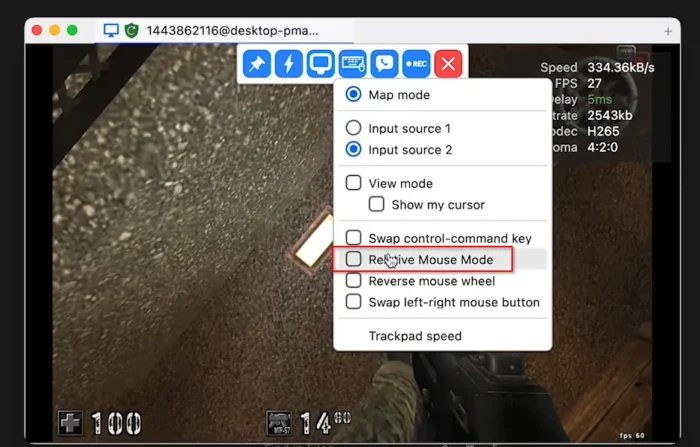
The new version of this Rust written remote desktop software introduced new relative mouse mode, which is useful for first-person shooting and 3D applications, e.g., AutoCAD.
The feature enables pointer lock-style cursor control with delta-based movement, which can be enabled either from menu or by pressing Ctrl+Alt+Shift+M keyboard shortcut.
However, it so far does NOT work for:
- Linux as the controlled side.
- Linux Wayland as the controlling side.
- Web as either controlling or controlled side.
- macOS as the controlled side.

For advanced user who use self-hosted server, the new version introduced new remote control permissions system, allowing to set different permission levels for different users connecting to a RustDesk instance.
The feature supports three-state permission level: enable, disable, not set. If server-provided control permissions are set to enable (or disable), then the result are enable (or disable), regardless of of local settings. If server-provided control permissions are “not set”, then local settings take effect.
It also includes few known issues. Along with the detailed permission calculation table, you may see them in the merge request page.
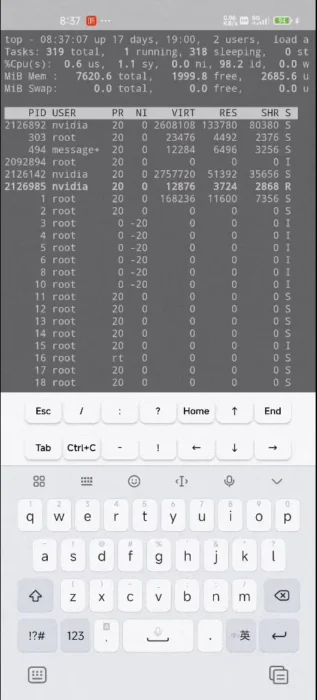
RustDesk 1.4.5 also implemented a mobile-only floating keyboard feature for terminal sessions. It added new “Show terminal control button” toggle option. With it enabled, it shows two-row floating keyboard bar, with buttons for special keys (e.g., Esc, Tab, Ctrl+C, arrow keys, Home, End) and special characters (e.g., /, :, ?, -, !).

For Linux, the new version improved the security and reliability by using a better way to get the home directory, refactored the TERM environment variable detection logic to improve terminal key handling (specially Delete, Home, End keys), and fixed mouse not working issue in Ubuntu 25.10 Wayland.
Other changes in the release include:
- Remove gzip compression support from Legacy AB push operations
- Add login requirement enforcement for the Note feature in remote connections.
- Delegate Windows server-to-client file reading operations to the Connection Manager (CM).
- Fix wake-lock when multiple tabs opened in same window.
- Fix that app window could be restored to inaccessible positions in multi-monitor setups.
- Other minor fixes.
How to Install RustDesk 1.4.5
The software provides official installer packages for Windows, Linux, macOS, iOS, and Android. Along with the source tarball, they are available to download in the Github releases page:
Go to “Assets” sections for more packages, and select download X86_64 for Intel/AMD, AArch64 (ARM64) for RasPi, Snapdragon, or Apple Silicon.
For Ubuntu, either download & install the Deb package via App Center (or Ubuntu Software).
Or install the Flatpak package (if you would like to run it in sandbox) by running the command below in terminal (Ctrl+Alt+T):
flatpak install drag-and-drop-flatpak-into-terminal
NOTE: Ubuntu does not support Flatpak out-of-the-box, run sudo apt install flatpak to enable and log out and back in to apply environment variable change.