Firefox 148.0 is finally available to download today, after 6 more Beta testing releases.
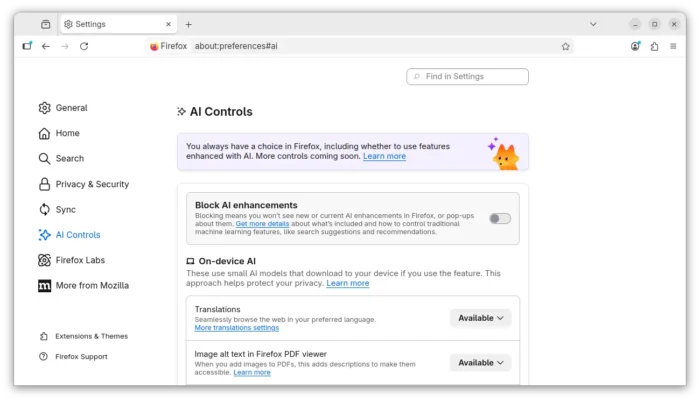
The new version of this popular web browser finally added visible options to disable the AI features, either globally or individually.
By going to Settings -> AI Controls or access about:preferences#ai, user can now simply use “Block AI enhancements” toggle to disable all AI features, or turn off individual AI features, such as translations, tab group suggestions, link previews, and sidebar chatbot, via their own options.

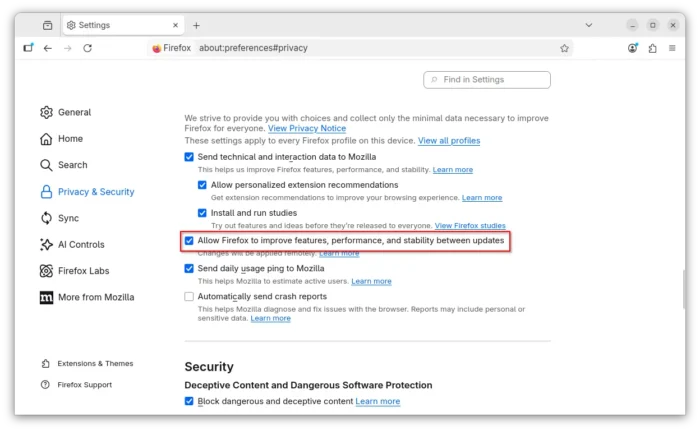
Remote improvements, the feature to receive fixes and feature changes remotely before they are released to all Firefox users, has been updated in the release without needing to share technical and interraction data (telemetry).
The feature is enabled by default unless you have deliberately opted out of studies in Settings prior to Firefox version 148.
And, user has choice to disable it by going to “Privacy & Settings” settings page, and turn off ‘Allow Firefox to improve features, performance, and stability between updates’ check-box.

Firefox Backup, the feature initially introduced in v146, now is available on Windows 10 to users who also use the “Clear history when Firefox closes” capability. And, it will NOT include any data which is set to be cleared when Firefox is closed.
New Tab wallpapers will now appear on new container tabs as well as new default tabs. The initial about:blank document is now Web-compatible. And, it improved support for screen readers accessing mathematical formulas embedded in PDFs.
Other changes in Firefox 148.0 include:
- New Traditional Chinese and Vietnamese translations.
- WebGPU support for service worker.
- Add support the CSS shape() function.
Iterator.zip()andIterator.zipKeyed()methods support.- Trusted Types API to prevent cross-site scripting attacks.
- Support Sanitizer API for new HTML manipulation methods.
- Add upport location.ancestorOrigins attribute.
- Add support the NavigationPrecommitController.addHandler() interface of the Navigation API.
- Support the
position-try-orderproperty as part of CSS Anchor Positioning. - Various security and other fixes.
Get Firefox 148.0
The official release note for Firefox 148.0 is not ready at the moment of writing, while, this tutorial is written according to the Github releases page.
See the link below for official release note:
And, the packages for Linux, Windows, and macOS, as well as the source tarball are available to download at ftp.mozilla.org/pub/firefox/releases/148.0/