Firefox 150.0, the new monthly release, is available to download for Linux, Windows, and macOS users.
The new version of this popular web browser added official .rpm package, allowing to easily install the browser in RHEL, Fedora, OpenSUSE, and other RPM-based distributions according to the github release page.
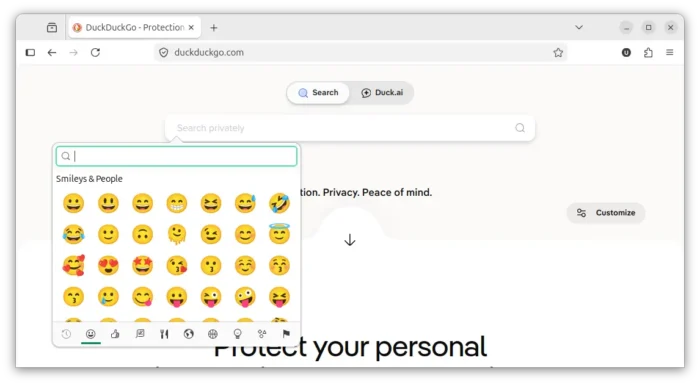
It as well added GTK emoji picker for Linux. User can press Ctrl + . to trigger the picker dialog, then browser, search, and insert emojis or symbols in anywhere in the Firefox window.

Firefox 150.0 extended the local network access restrictions to all users. Meaning, it will require websites to ask for your permission before connecting to devices in local network or to apps and services on your device.
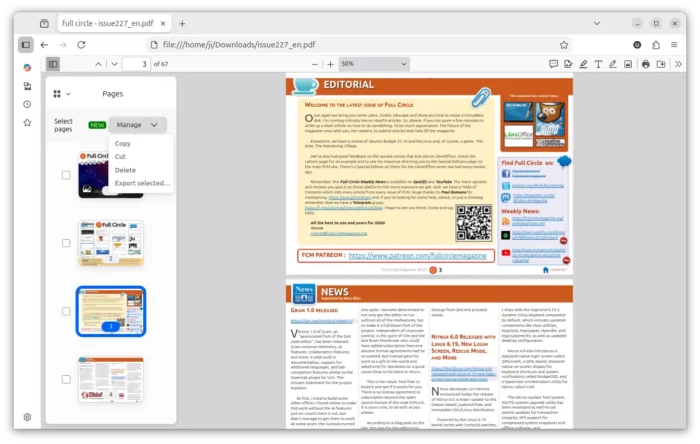
This version also improved PDF editing support. When viewing a PDF file in Firefox, you can now click the new “Manage pages” icon in the toolbar, then drag and drop re-arranging PDF pages, or copy, cut, delete, or export select PDF pages.

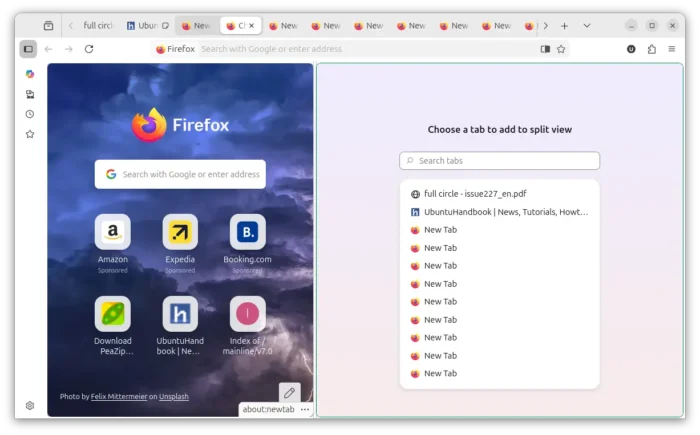
The split view feature has also been improved. It allows to right-click on any link and choose “Open Link in Split View“, so that it will open the link alongside your current tab.
If you have too many opened tabs, then you can now use the new Search function to quickly find out the tab to open side-by-side. And new “Reverse Tabs” option it added to tab context menu, allowing to exchange the position of the two tabs in split view.

For Windows, the new Firefox Profile management system is now available to all users, including users on Windows 10. The web apps are now available to all users who installed Firefox through the Microsoft Store. And, backing up a profile to a file is now available to all Windows 10 and 11 users, including those who use the new profile management system.
Other features in the new release include:
- Share multiple pages via context menu option.
- Type “translate” in URL bar will show a quick-action shortcut to access the local translations page.
- New setting option to turn off drag-and-drop group creation.
- Various security fixes.
For developers, Firefox 150.0 as well features:
- Support ariaNotify API for accessibility notifications.
- Support media element pseudo-classes, e.g.,
:playing,:paused. - Add support highlightsFromPoint() API.
- Add support
light-dark()on images, useful for dark mode websites. - Remove the limitation that only accept two color values in
color-mix()function. - Add new
autovalue support on the sizes attribute for lazy-loaded image elements with multiple images defined viasrcset. - Add new element-specific section to the pseudo-class toggle panel.
- And more.
Download Firefox 150.0
The official announcement as well as the download link will be soon available in Firefox website via the link below:
If you can’t wait, then get it from this Mozilla web page.