The Linux Kernel 3.12.11 has been released today, along with Kernel 3.10.30 LTS and Kernel 3.13.3. If you’re using Kernel 3.12, it’s recommended to upgrade to this kernel release or Kernel 3.13.
The kernel 3.12.11 mainly brings updated architectures, including ARM and x86, numerous updates drivers (i915, nouveau, radeon ,and usb), as well as a few bug fixes. For details, see the announcement.
Upgrade / Install Kernel 3.12.11:
The DEB packages of this kernel release has been made into Ubuntu Kernel Page, including the Low-latency packages.
For command line, you can follow the steps below to download and install them.
1. Press Ctrl+Alt+T on keyboard to open the terminal. When it opens, run the commands below one by one to download the DEBs:
If you’re running a proprietary video driver, you may re-build or re-install to get it work with the new kernel.
If for some reason this kernel release doesn’t work properly for you, reboot into previous kernel (Grub -> Advanced -> select previous kernel) and run this command to remove Linux Kernel 3.12.11:
The latest Linux Kernel LTS 3.10.30 has been announced today. Greg KH urged all users of this kernel series to upgrade as soon as possible.
Kernel 3.10.30 is a small release which mainly brings some updates drivers, including i915, nouveau, radeon, and mcc, as well as some fixes. For details, see the announcement.
Install / Upgrade to Kernel 3.10.30:
The Ubuntu Kernel Team has build the deb packages which are available in this page.
For command line, you can follow the steps below to install them:
1. Press Ctrl+Alt+T on keyboard to open the terminal. When it opens, run the commands below one by one to download this kernel:
After the installation, it automatically updated your grub boot loader. Just restart and boot with new kernel.
If you’re using a proprietary video driver, you may need to re-build or re-install to get it work with the new kernel.
If for some reason this kernel release doesn’t work properly for you, reboot into previous kernel (Grub -> Advanced -> select previous kernel) and run this command in terminal to remove Linux Kernel 3.10.30:
The latest Linux Kernel 3.13.3 has been announced today. All users of the 3.13 kernel series are urged to upgrade as soon as possible.
Linux kernel 3.13.3 brings updated architectures, including ARM and x86, numerous updates drivers (i915, nouveau, radeon ,and usb), as well as a few bug fixes. For details, see the announcement.
Install / Upgrade to Kernel 3.13.3:
The Ubuntu Kernel Team has build the deb packages which are available in this page. Low-latency Kernel packages are included.
If you’re comfortable with command line, you can also follow the steps below to download & install this kernel:
If you’re using a proprietary video driver, you may need to re-build or re-install to get it work with the new kernel.
If for some reason this kernel release doesn’t work properly for you, reboot into previous kernel (Grub -> Advanced -> select previous kernel) and run this command to remove Linux Kernel 3.13.3:
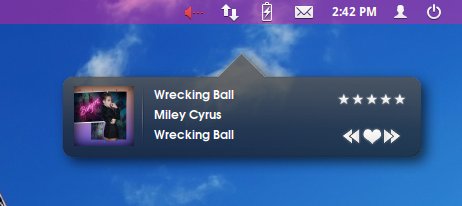
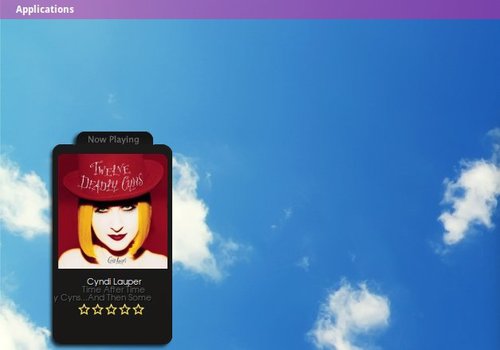
CoverGloobus is a simple application that displays the cover and the info of playing song on your desktop as a nice widget.
If you have been using Ubuntu for years, you may have heard of CoverGloobus. The project was last updated 4 years ago, but it’s still working good on Ubuntu 12.04. I’ve tested it on Elementary OS Luna, here are the screenshots:
CoverGloobus downloads lyrics and covers from internet and supports the most popular music plays, including Amarok2, Audacious, Banshee, Deadbeef, Exaile, gmusicbrowser, MOC, MPD, Rhythmbox, VLC, Songbird, Totem, and more.
Once installed, open it from Application Menu and right click on the widget to configure the player, themes, etc.
To make it work with Noise music player, download the below package, extract and paste the “Noise.py” & “Noise.pyc” files to /usr/share/covergloobus/players
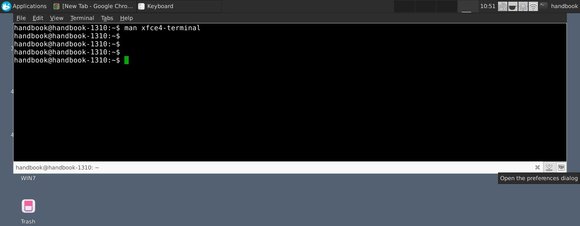
As you may know, Xfce4 terminal supports the Quake style drop-down mode since version 0.6. Just a parameter --drop-down will start xfce4-terminal just like quake, yakuake, or tilda.
It is advised to bind this feature to a shortcut in the keyboard preferences. Below steps will teach you how:
1. Open xfce4-setting-manager from Application menu or Alt+F2 Application Finder box.
2. Click on the Keyboard icon under Hardware section.
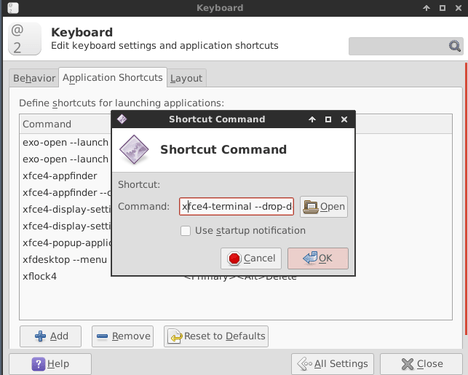
3. Under Application Shortcuts tab, click on the Add button and type in the command box xfce4-terminal --drop-down
4. Click on OK and set a keyboard shortcut in next window.
Now you’re able to press the keyboard shortcut to launch a drop-down Xfce4 terminal. Click the button at right-bottom to open the preferences dialog and edit the width, height, opacity, duration and more!
The latest version of Firefox is usually available as a security update in all supported releases of Ubuntu within a few hours of Mozilla’s announcement.
This time, Canonical announced the updated to Firefox 27 in its supported Ubuntu releases six days later since it was released on February 4, 2014. See what’s new in Firefox 27
How to Upgrade:
Firefox 27 is available in recommended repository for Ubuntu 13.10, Ubuntu 12.10 and Ubuntu 12.04.
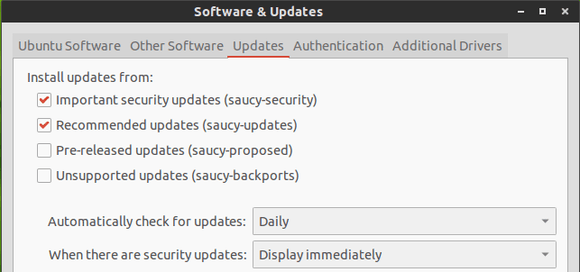
To get started, make sure the recommended updates repository is enabled.
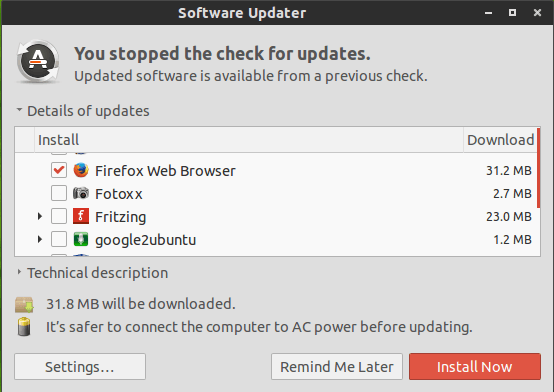
Then you can install the Firefox updates via Software Updates:
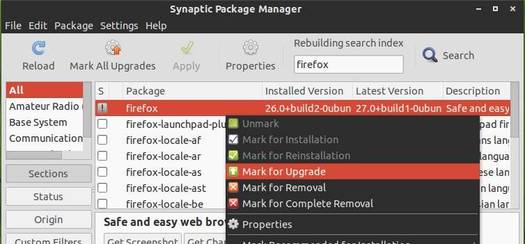
You can also use Synaptic Package Manager (available in Ubuntu Software Center) to upgrade your firefox:
Bored with the default Grub bootloader? You may give Burg a try. Burg is a Grub based boot loader which works in both text and graphic mode. There are quite a few themes so that you can always make your boot menu beautiful.
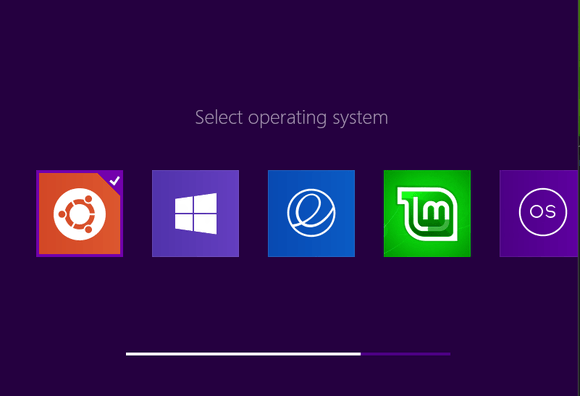
Below is the burg boot menu with Metro theme.
Install Burg:
Press Ctrl+Alt+T on your keyboard to open the terminal. When it opens, run the commands below one by one to install Burg from PPA:
UPDATE: Ubuntu 14.04, Ubuntu 14.10, and derivatives are added support!
So far, the PPA supports Ubuntu 13.10, Ubuntu 13.04, Ubuntu 12.10, Ubuntu 12.04, Ubuntu 11.10, Ubuntu 11.04 and their derivatives.
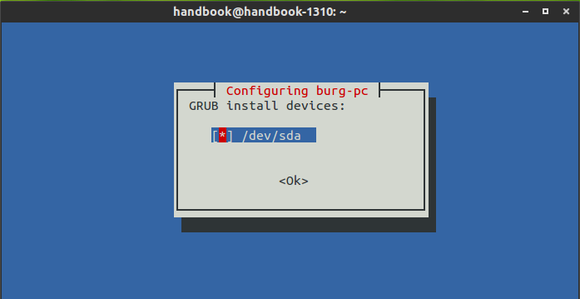
While the installing process, click OK to answer all questions. In the below screen, you need to press the Space key first to select your disk name and Tab key to select OK.
Install Theme for burg:
There are 16 themes available by default. You can download more themes at deviantart.com and install them via following steps:
2. Extract the theme package and put the result folder into /boot/burg/themes/ directory. Run below command in the terminal to open file browser with root, then do the copy and paste things.
sudo nautilus
3. The theme misses Linux Mint logo. Download the below icons and put them into /boot/burg/themes/Metro/icons/ if need.
hover_linuxmint
normal_linuxmint
Then edit the icons file in the same folder and added the line below to make the icons work:
In testing mode, press F2 to switch the themes. You can also press F3 to change resolution in the real burg boot menu.
Tips: You can edit the “menuentry” sections in “/boot/burg/burg.cfg” to remove unwanted menu entries.
Also uncomment “GRUB_DISABLE_LINUX_RECOVERY=”true”” in “/etc/defaut/burg” will hide the recovery mode.
Restore Grub:
To revert back to original grub boot loader, run the command below in terminal:
sudo grub-install /dev/sda
/dev/sda is the disk name (Run sudo fdisk -l to check it out).
Bluefish, a powerful editor targeted towards programmers and webdevelopers has reached version 2.2.5. Here’s how to install it in Ubuntu 13.10, Ubuntu 12.04, Ubuntu 12.10, Linux Mint and their derivatives.
According to the changelog:
Bluefish 2.2.5 is a minor bug fix release but has also quite some new features. The syntax scanning engine is faster after small changes to the text. The filebrowser is also much faster with less memory usage, with various fixes and new features. Projects now store the active document and active line numbers. Indenting is improved in auto-completion and the smart indenting. Bookmarks and paste special also have been improved. On OSX there are many improvements, such as Mavericks support, Retina display support, working system hotkeys, native input methods (Japanese, Chinese, etc.), opening files from the finder and Widget bindings on MacOSX are moved to Cmd+C|V|X|A and working. Furthermore almost all syntax highlighting has been improved, most notable jquery in javascript, HTML5, and HTML5 in PHP files. There are also many bug fixes, such as in wrap text on right margin, in the replace engine, the jsmin licence, the split lines feature, the auto-recovery and many obscure bugs. Last bluefish now has an appdata file.
Install Bluefish:
Press Ctrl+Alt+T on your keyboard to open the terminal. When it opens, run the commands below one by one to install Bluefish from PPA: