Darktable, the free open-source photography app and raw developer, released new major 5.4.0 version yesterday.
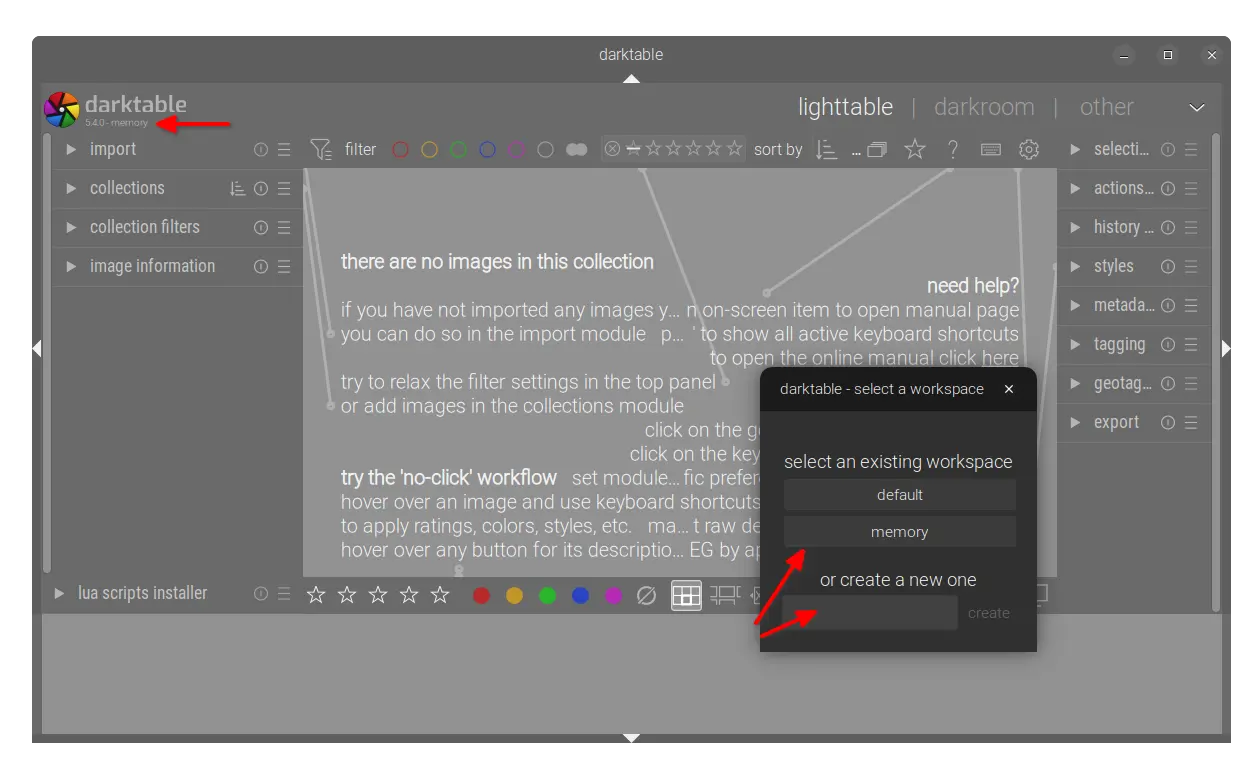
The new release of this GTK software introduced multiple workspace support. Like “user profile” feature for Firefox, user can now add custom workspaces at app start for Darktable. And, each workspace has it’s own database and configuration file.
Simply go to Preferences -> storage -> database and enable “allow for multiple workspaces” option. Then, on every start of Darktable, it shows a small window for choosing or adding a new workspace.
As you see in the screenshot below, it includes “default” workspace which is the one created on first launch, “memory” workspace that keeps database in memory and discards once you close the app window. And, you can create (or delete at next launch) as many workspaces as you want.
For a non-default workspace, the app window will display the workspace name in top-left alongside the version number.
The release added new Capture Sharpening in the demosaic module, which tries to recover details lost due to in-camera or lens blurring. See the user-manual page for more about it.
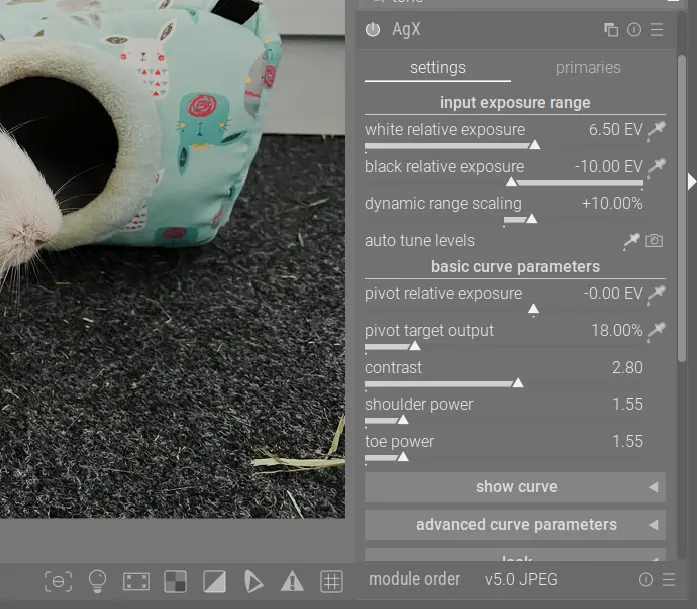
It also added the new AgX module to apply a tone mapping curve, which is inspired by Blender’s AgX tone mapper. The new module provides more extensive color output controls than Sigmoid, and it allows to set exposure white and black points explicitly similar to Filmic RGB. And, it includes user adjustable pivot point, contrast around this pivot, and contrast in highlights/shadows.
For Linux with GNOME, KDE, or other desktops with Wayland, Darktable received many fixes and improvements. It now should work on Wayland as good as it was on X11.
As well, there are many new cameras support. They include the base support for Canon EOS R1 / R5 Mark II (needs LibRaw >= 0.22-PreRC1), Canon PowerShot D10 (DNG) / S100V / S2 IS (DNG), Fujifilm FinePix HS33EXR, Fujifilm X-E5 (compressed), Kodak DCS Pro SLR/c, Kodak P712, Leica D-Lux 8, Leica M EV1 (DNG), Leica Q3 Monochrom (DNG), Leica X-E (Typ 102) (DNG), Nikon Z fc, OM System OM-5 Mark II, Olympus SP550UZ/SP565UZ, Panasonic DC-S1M2/DC-S1M2ES (3:2), Ricoh GR IV (DNG), Ricoh GX200 (DNG), Sony DSC-RX1RM3, and Sony ZV-1M2.
Other changes include:
- Add the standard “Window” menu to the application menu bar on macOS.
- Add new keyboard shortcuts:
cto toggle crop box.eto set exposure compensation.alt - rto set image rotation.alt - [andalt - ]to fine rotation adjustment.
- 5% to 20% speed up for the Lut3D module.
- Support hierarchical presets for utility modules and processing modules.
- Dual demosaicing now works also in tiling mode.
- Add RGB percent display in the color picker module.
- Remove the “overwrite” option from the lighttable history stack module.
- Add manual chroma subsampling control for AVIF export.
- Update LUA API to v9.6.0.
- UX/UI and performance improvements, as well as numerous bug-fixes.
How to Install Darktable 5.4.0
The official release note as well as the installer packages for Linux, Windows, and macOS are available in the Github releases via the link below:
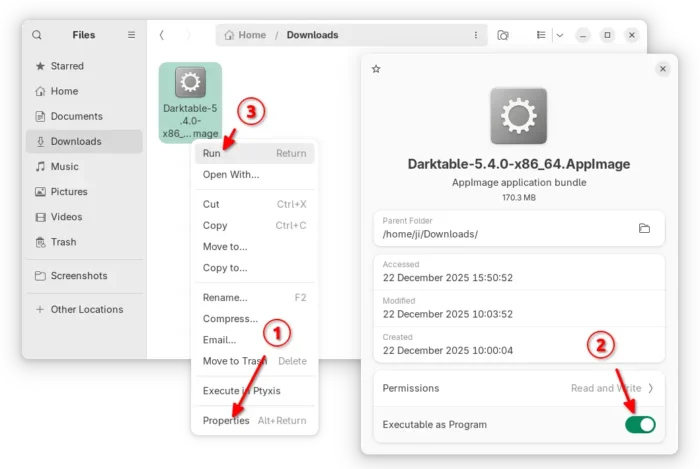
For Linux on AMD/Intel platform, select download the AppImage. Then, add executable permission from file properties. Finally, click Run to launch the software.
Tips: Ubuntu 22.04 and higher need to install libfuse2 package via the command below (Ctrl+Alt+T) for appimage support.
sudo apt install libfuse2
There’s also community maintained Flatpak package for Linux on both amd64 (AMD/Intel) and arm64 (e.g., RasPi and Snapdragon X), though it runs in sandbox environment.
For Debian, Ubuntu, Fedora, etc Linux Distributions who prefer the native .deb and .rpm packages, there’s an official OBS repository (server’s done at the moment of writing) available for choice.
And, I’ve built the new release package into this unofficial PPA for Ubuntu 22.04, Ubuntu 24.04, Ubuntu 25.04 and 25.10 users on amd64 and arm64.
To add the PPA and install darktable 5.4.0, run commands in terminal (Ctrl+Alt+T) one by one:
sudo add-apt-repository ppa:ubuntuhandbook1/darktable
sudo apt update
sudo apt install darktable
Note for Ubuntu 22.04, there’s neither HEIF nor JXL support because the system dependency libraries are old. Please leave comment below if you do need the feature.