GNOME, the default desktop for Ubuntu and Fedora Workstation, will probably replace its default system monitor app in next release.
It’s Resources, a free open-source system monitoring application that uses GTK4 plus libadwaita for its modern UI that’s looking native in recent GNOME desktop releases.
Ubuntu has already made Resources as default in Ubuntu 26.04 LTS. If everything goes well, it will be probably a core app in next GNOME 51, meaning default in future Fedora Workstation, Arch, Debian etc releases with GNOME.
As you may know, GNOME introduced several new default applications in the recent releases, such as Showtime video player, Papers document viewer, Decibels audio player, and Loupe image viewer.
Just a few days ago, GNOME Incubator merged the Resources project, meaning GNOME is considering to have it as new core and default system monitor app.
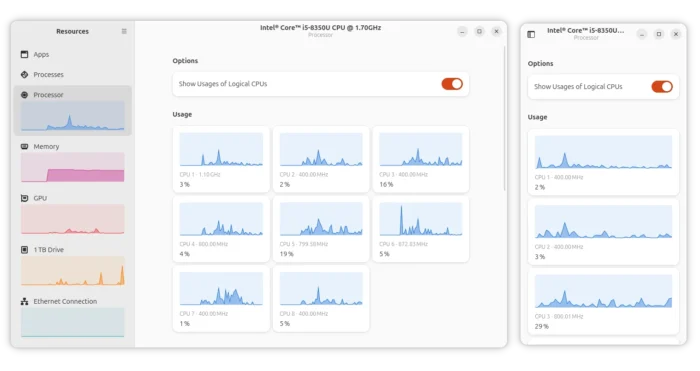
As you see via the screenshot below and above, Resources is a modern app that monitors your running apps and processes with basic end and kill etc operations. It as well monitors real time CPU, memory, GPU, NPU, network, disk, and battery usage with graphs. And, it features an adaptive UI that fits well with small screen sizes (e.g., tablet and mobile phone).
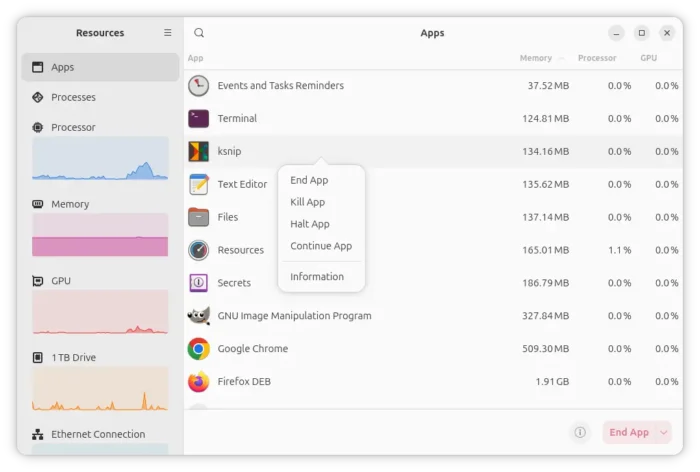
Resources monitor app processes
nokyan, the core developer of Resources, submitted the project a few months ago to GNOME Incubator to replace the current GNOME system monitor. With help of Gnome team members, he is working to meet the incubation criteria so it can be included as core in next GNOME 51.
Try out Resources
As mentioned, Resources is default in Ubuntu since 26.04. Other Linux distributions may try it out via the official Flatpak package.
NOTE: Resources will soon rename its ID to org.gnome.Resources. Please report if you found the current package ID does no longer exist.
While Fedora and Linux Mint can simply search & install it from either GNOME Software or Software Manager, Ubuntu 25.10 (and earlier) and other Linux may do the steps below one by one to get the package.
- First, enable flatpak support. For Debian/Ubuntu, simply open terminal (Ctrl+Alt+T) and run command:
sudo apt install flatpak
- Then, install the Resources flatpak package via command:
flatpak install https://dl.flathub.org/repo/appstream/net.nokyan.Resources.flatpakref
Tips: If the app icon is not visible, log out and back in, or run command to start from terminal:
flatpak run net.nokyan.Resources
For those who do not like running apps in sandbox, Arch Linux user may install the resources package from the extra repository, and, Fedora may get it from this community maintained Copr repository.