RustDesk, the free open-source remote desktop software, released new 1.5.1 version yesterday.
The new version of this popular application introduced keyboard shortcuts support for remote session!
By going to “Settings -> General”, you’ll see a new option “Enable keyboard shortcuts in remote session”.
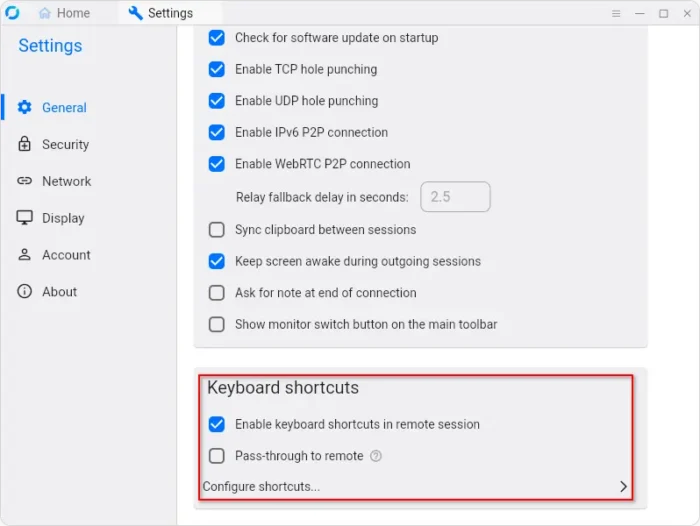
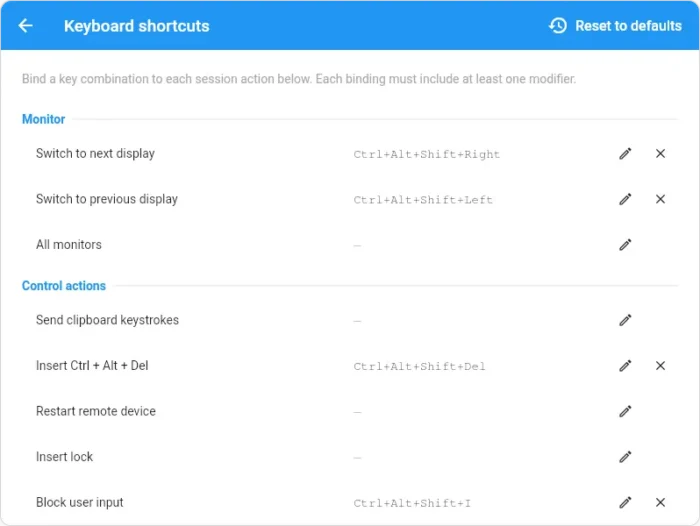
With it enabled, you can then set custom keyboard shortcuts for common actions, such as scale mode, image quality, video codec and more.
And an optional “Pass-through to remote” is available. In the case, all the bound key combinations will be send to the remote device instead.
Though, don’t know why remote pass-through does not work in my case when accessing remote Windows 10 from Ubuntu 26.04.
RustDesk 1.5.1 also improved its software update mechanism. It now verifies the digitally signed update metadata before downloading and installing updates, making the automatic update process more secure than before.
This version also introduced Trusted Device V2, to replace the old HWID-based trusted-device registration.
The new method generates a random 32-byte token and securely stores it on both devices. And, the host can choose how long a device remains trusted, e.g., 1 day, 7 days, 30 days, 90 days, or never.
Existing unexpired V1 trusted devices can continue working after the host upgrade. But expired or missing legacy registrations can not be restored.
For Android, RustDesk now supports direct file transfer between the app and folders outside the app workspace.
The File Transfer screen now has two new options: RustDesk storage for browsing files in app’s own storage and Other folders for folders outside.
After granting permission, it can now browse, create, rename, delete files and folders directly through that folder’s document provider. And, Android host can choose which folder remote devices are allowed to access.
Other changes in RustDesk 1.5.1 include:
- Added toolbar button to open web console from the Address Book tab.
- Remove rendezvous server ability to push new rendezvous-server list to RustDesk clients through
ConfigUpdate. - Improve remote-screen image quality by periodically re-encoding unchanged screen content.
- Improve image quality while preventing excessive frame encoding on Android.
- Various bug-fixes.
Get RustDesk 1.5.1
The official release note as well as the installers for Windows, Ubuntu, macOS, Android, iOS, and other Linux are available in Github via the link below:
RustDesk works out-of-the-box with a public server, which helps establish connections while data is transferred peer-to-peer.
For privacy, performance, and more control, you may setup self-host via the official guide.