
Faugus, the simple and lightweight app for running Windows games on Linux using Proton, released several new releases in the past few weeks.
The new versions introduced several UI and UX improvements, performance improvements, and various bug-fixes.
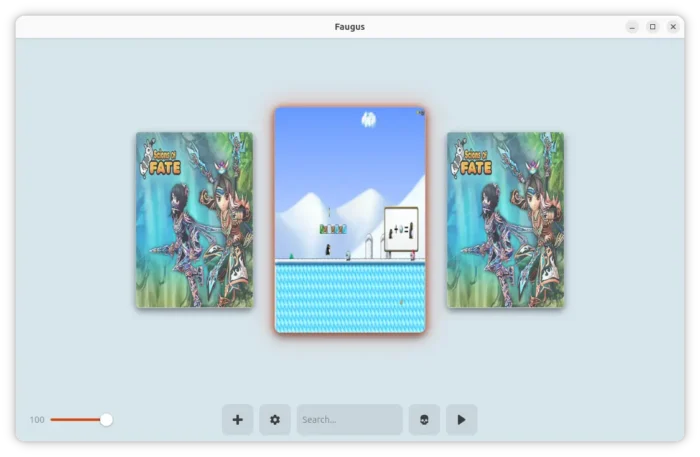
Faugus cover view
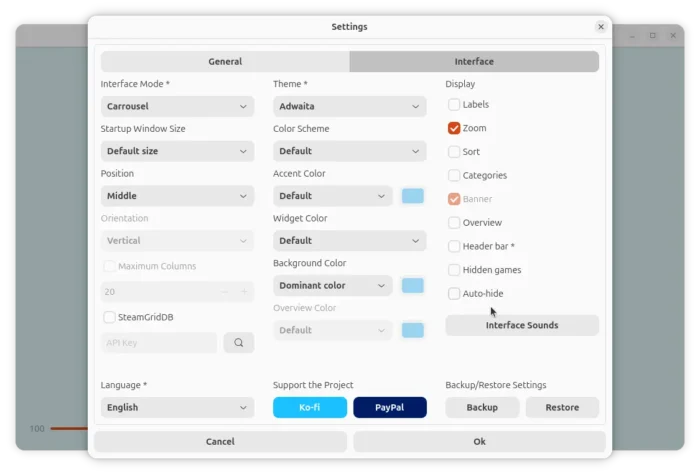
First, the interface setting page now provide an option to auto-hide the bottom widgets. With it enabled, the buttons to create, search, kill, and/or run games, and open settings dialog are hidden automatically.
Most settings now include tool-tips explaining what they do. And, most settings can now be changed in real time without restarting the app. While, settings that still require a restart are marked with an asterisk (*) after their names.
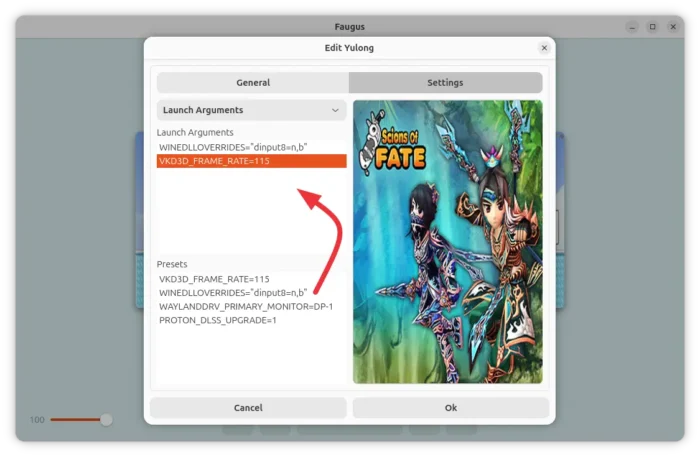
The Launch Arguments buttons have been removed. Instead, user can open game settings page, then drag and drop between the Presets and Launch Arguments lists.
The manual Protonfix option has also been removed, because it was rarely used and most Protonfixes are applied automatically by Proton. Though, you can still add one by using launch arguments, such as GAMEID=umu-123456.
The latest Faugus 2.5.6 now supports Discord Rich Presence. Your Discord friends can see what game you are playing on your Discord status.
Though, for Discord Flatpak package, you need to grant --filesystem=xdg-run/app/com.discordapp.Discord permission.
When adding a game, Faugus now automatically detects the title, icon, and cover from executable file if available. So, you no longer need to manually download game icons and covers or settle for the default ones.
Other changes in recent Faugus include:
- Run the splash and donate windows in separate processes to free memory.
- Load covers, banners, GTK (in the runner) on demand.
- Reduce resource usage and improve scrolling smoothness in large game library.
- Add
python-psutilto AppImage bundle.
Get Faugus launcher
The official release notes as well as the installer packages are available in the Github project page via the link below:
Depends on your Linux distribution, choose .deb package for Debian/Ubuntu, .rpm for Fedora, or pkg.tar.zst for Arch. While, the universal AppImage package works in most Linux, Intel/AMD only.
There’s also a Flatpak package which runs in sandbox in most Linux distributions.