Just a week since the last 4.6 version, the lightweight Audacious music player announced new 4.6.1 bug-fix release.
The new version of this free open-source application adopted XDG cache dir, added new Georgian translation, and fixed some bugs.
Improved Flatpak / Snap support
First, the new Audacious 4.6.1 now stores temporary files in XDG cache dir (.cache or .var/app/APPID/cache) instead of system /tmp directory. This is useful for Flatpak or Snap packages that run in sandbox environment.
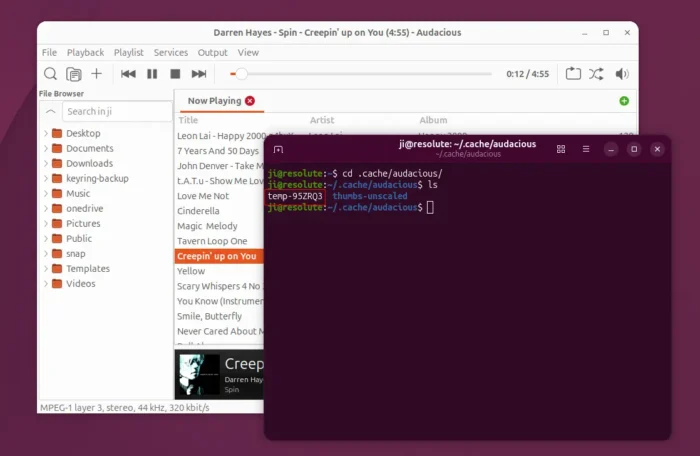
For security reason, Flatpak and Snap packages do not have access to system /tmp, instead they have their own private /tmp directory.
The previous Audacious versions however use the host’s /tmp directory causing some features, such as album cover display not working in MPRIS (e.g., system tray media control, or Gnome 50 lock screen) for sandboxed apps due to permission access issue.
With the new version, the XDG cache dir is in use so that all the app packages have permission access to the temporary files for everything working properly.
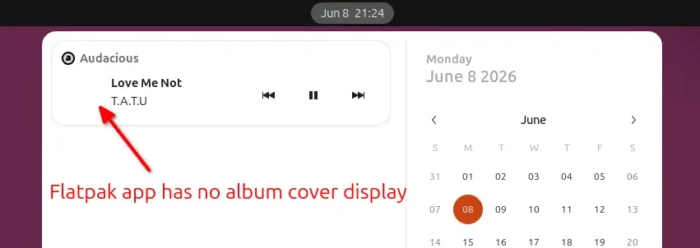
Flatpak or Snap package previously do not display album covers in MRPIS
Fix for Ubuntu PPA
For Ubuntu and Linux Mint users who use the PPA package, the last 4.6 version was built improperly that may run into core dump crash or dependency issue.
The reason is that I built with the updated Ubuntu’s packaging rule from 26.04. It changed library names (e.g., libaudgui5 -> libaudgui6, libaudqt2t64 -> libaudqt3), but I forgot to add rule to automatically remove the old ones during the package upgrading process, thus you may have multi-versions of the libraries installed at the same time causing the issue.
To “fix” the issue, the new 4.6.1 version increased the .so and plugin ABI version numbers, so even you have both 4.6 and 4.6.1 installed at the same time in the same package format (though the PPA shall now avoid the case), audacious will continue working as they use the libraries in different versions.
Other changes in Audacious 4.6.1 include:
- Add Georgian translation.
- Support audio files with embedded lyrics in more cases.
- Fix building on system using musl.
Install Audacious 4.6.1
For the official release note and source tarballs, go to Audacious website via the link below:
Besides building from the source, there’s also community maintained Flatpak package and Snap package (available in Ubuntu App Center) which are NOT updated at the moment of writing.
And, the unofficial PPA (and synced with this one) has updated with the new package for Ubuntu 20.04, Ubuntu 22.04, Ubuntu 24.04, and Ubuntu 26.04.
To add the PPA, and install Audacious 4.6.1 in Ubuntu, run the commands below one by one in terminal (Ctrl+Alt+T):
sudo add-apt-repository ppa:ubuntuhandbook1/apps
sudo apt update
sudo apt install audacious audacious-plugins
For any reason, you may purge PPA and downgrade Audacious to the stock versions by running command:
sudo apt install ppa-purge && sudo ppa-purge ppa:ubuntuhandbook1/apps
Or, just remove the music player (useful for a clean re-install) by running command:
sudo apt install audacious audacious-plugins-data --autoremove
And, feel free to leave comment below or send me email if you still have issue for the package installed from PPA.