
Ventoy, the popular solution for booting .iso images from USB, released new 1.1.17 version one day ago.
The new version of this free open-source software added two new Linux Distributions support, optimized Secure Boot process, and fixed many issues.
Different to the traditional bootable USB creator (e.g., Rufus, UNetbootin), Ventoy create a small (around 34 MB) EFI partition on your USB, while all other parts act as a normal USB storage.
Just move or paste .iso images into the USB drive, along with your photo images and other files. When booting from the USB, it will show you a menu with all boot-able iso images.
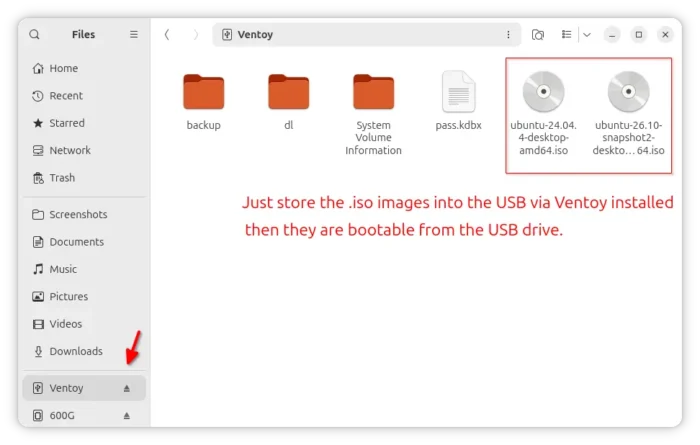
It supports most type of OSes, including WinPE, Windows 7 ~ 11, Windows Server 2012~2015, tons of Linux Distributions, many Unix, ChromeOS, VMware ESXi, Citrix XenServer, Xen XCP-ng, and support formatting the main USB partition to FAT32, exFAT, NTFS, UDF, XFS, Btrfs, or Ext2~4.
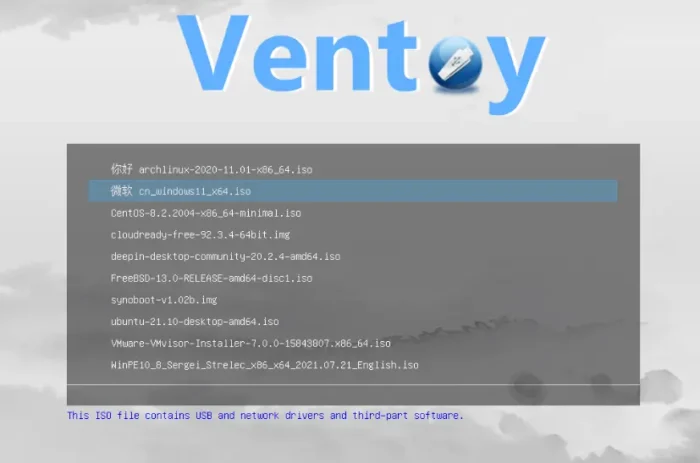
image from https://github.com/ventoy/Ventoy
Ventoy is tested on 1300 iso files. With the new 1.1.17 version, two new Linux Distributions are support. They are:
- Athena OS, Arch/Nix-based Distro, that contains a collection of tools for penetration testing.
- EulerOS, commercial Linux distribution developed by Huawei based on RHEL for server and cloud environments.
Besides new Linux Distributions support, this version also improved the Secure Boot process. Previously, when SecureBoot enabled, Ventoy grub must be launched by Ventoy Shim.
With the new version, the following exceptions will also work when the Shim protocol doesn’t exist:
- Ventoy key was enrolled directly to the UEFI DB.
- Some UEFI firmware (MSI) has Image Execution Policy as Always Execute which means Secure Boot is effectively disabled.
Other changes in the release include:
- Fix the boot issue for latest GhostBSD.
- Fix the boot issue for some UOS release.
- Add log for live injection process.
- Fix fdisk detection on BusyBox systems.
- Fix proxmox-ve can not boot after install in grub2 mode.
For more changes, see the releases page in the Github source. And, see the official guide for how to install or update Ventoy.