



GNU Octave, the open-source programming language for scientific computing and numerical computation, released new 11.2.0 version a few days ago.
This is the second release in the 11.x series, which features many performance and core improvements, GUI enhancements, documentation updates, and bug-fixes.
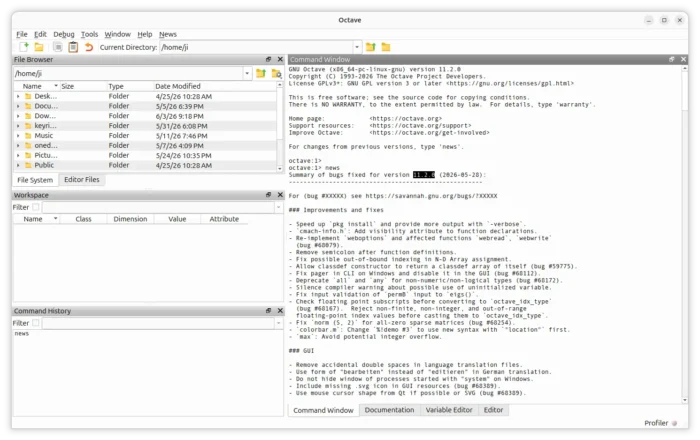
First, the new Octave 11.2.0 included many core improvements. It sped up the pkg install command and added more output with -verbose. It added visibility attribute to function declarations, and, re-implemented weboptions and related functions webread, webwrite.
It also removed extra semicolons after function definitions, fixed N-D array assignment to prevent out-of-bounds indexing, and, added ability for class constructors (classdef) to return a classdef array of itself.
This version also updated the GUI. It fixed the double spaces in translations, improved German translation. It now uses mouse cursor shape from Qt if possible or SVG. And, for Windows “system” calls no longer hide windows.
Besides the GUI and core improvements, Octave 11.2.0 also fixed some issues for building system, and, updated the documentation for arguments keyword (and add to manual).
Other changes include:
- Deprecate
allandanyfor non-numeric/non-logical types. - Fix input validation of
permBinput toeigs(). - Fix pager in CLI on Windows and disable it in the GUI.
- Check floating point subscripts before converting to
octave_idx_type. - Reject non-finite, non-integer, and out-of-range floating-point index values before casting them to
octave_idx_type. - Fix
norm (S, 2)for all-zero sparse matrices. - Avoid potential integer overflow for
max.
For more about the new release, see the NEWS file in the source tarball (see the link below).
Get GNU Octave 11.2.0
The source tarball is available to download at GNU website via the link below:
Besides building from the source, Arch Linux has already include the new 11.2.0 release in the official Extra repository. While other Linux may keep an eye on the community maintained Flatpak package that runs in sandbox.
For Ubuntu users who prefer the native .deb package, I’ve made the new release package into this unofficial PPA for Ubuntu 22.04, Ubuntu 24.04, and Ubuntu 26.04, though without testing.
To add the PPA and install Octave 11.2.0, open terminal (Ctrl+Alt+T) and run commands below one by one:
sudo add-apt-repository ppa:ubuntuhandbook1/octave
sudo apt update
sudo apt install octave
Uninstall:
To uninstall the .deb package, run command in terminal:
sudo apt remove octave octave-common
And, use the command below to uninstall the PPA:
sudo add-apt-repository --remove ppa:ubuntuhandbook1/octave
For Linux Mint, also run sudo apt update to manually refresh package cache afterward.















11.3.0 was released 2 days later with some regression fix(es) :-/
Thanks for letting me know the new update release. I’m working on PPA for the new .deb package. If everything goes well, it will be available in next few hours.
Cheers.