Auto-cpufreq, automatic CPU speed & power optimizer tool for Linux, released new 3.1.0 version an hour ago.
The new version of this free open-source tool improved its graphical user interface with some new functions, and fixed various bugs.
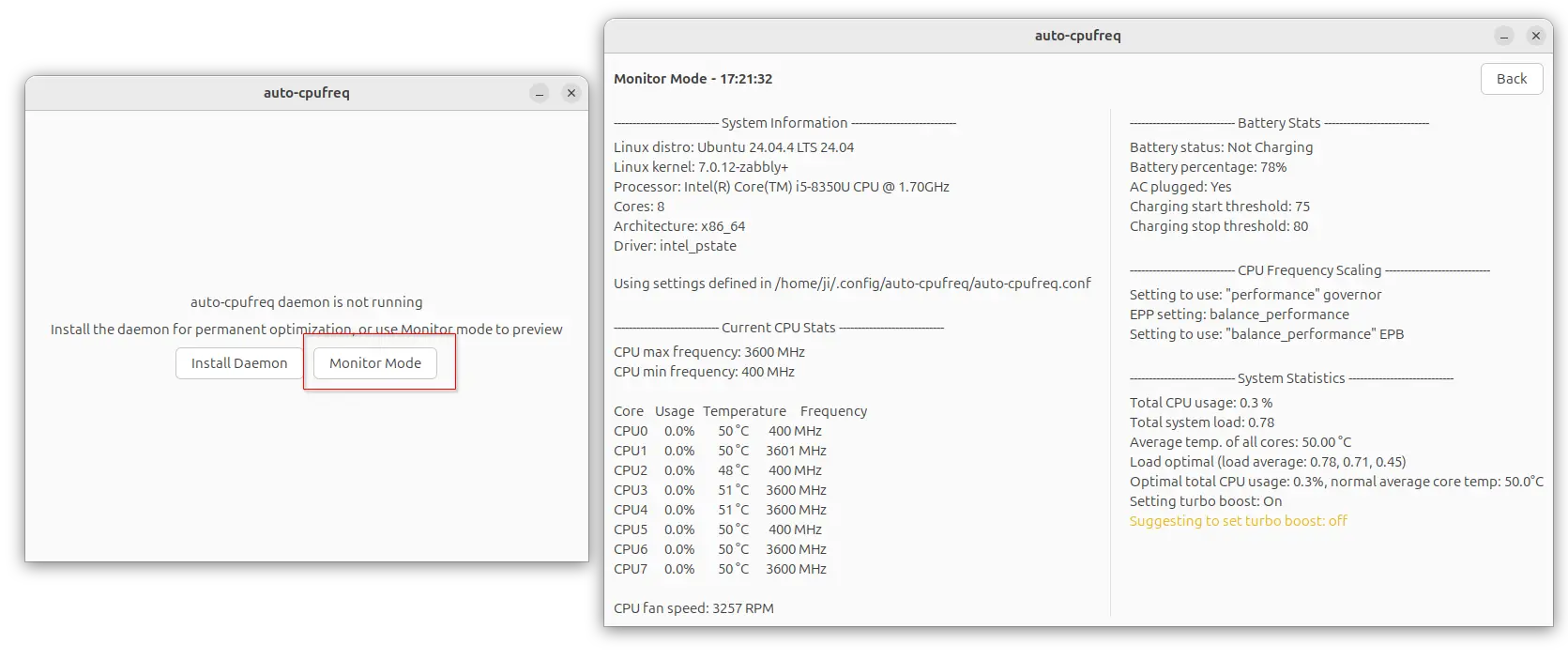
First, the new version introduced a Monitor Mode for its GTK UI. Without installing the daemon for automatically adjust CPU speed according to your profile, the monitoring mode allowing to monitor your CPU speed, utilization, and temperature on per-core basis with the similar layout from the CLI.
This can be useful for some desktops (e.g., GNOME) that has built-in power management, and you just want to monitor your CPU and battery stats.
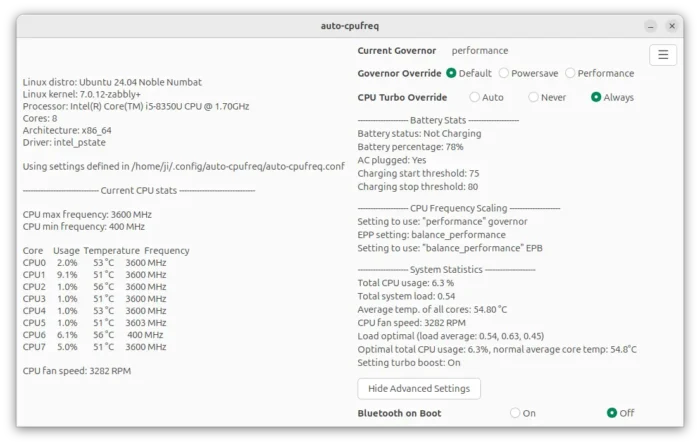
After installed the daemon, the tool then automatically adjust your CPU frequency according to which governor (power-saving, default, or performance) you selected, and allows to manually toggle on/off the CPU turbo. And, experienced users can use auto-cpufreq.conf config file for more control, such as the minimum and maximum CPU frequency in kHz.
With the new 3.1.0 version, a new Advanced Settings section is added, allowing to control whether to enable Bluetooth on system boot.
This version also improved Lenovo laptops support. It changed the way looking for the control file that’s responsible for battery charging threshold.
Previously, it checked the fixed location for the control file. But different Lenovo models (e.g., ThinkPad, IdeaPad, Legion, Yoga) or different kernel/firmware versions, may expose the file in different locations. Now, it uses a new function to search several known locations, making sure the battery feature work on more Lenovo laptops.
For laptops with built-in hardware shortcut to change power profile, e.g., Fn+Q on Lenovo Legion, this version added new enforce_platform_profile configuration option that can be used in the auto-cpufreq.conf config file.
The options is default to true, meaning auto-cpufreq will override the change whenever user presses on the keyboard shortcut. When set to false, user can press that hardware shortcut to change power profile at anytime, but it will also be overridden when you switch profile in auto-cpufreq.
For developers who use poetry package management tool to test this tool, PyGObject is added as an optional poetry dependency and documented it in the README. It’s required for the GTK UI, but not for command line only interface.
Other changes in auto-cpufreq 3.1.0 are mostly bug-fixes. They include:
- Fix app crash on computers without a battery.
- Fix battery drain issue on laptops with NVIDIA discrete GPUs.
- Fix CPU frequency limit issue after turbo boost changes.
For more details, see the Github releases page.
How to Install auto-cpufreq
NOTE: Install auto-cpufreq daemon will automatically disable GNOME’s built-in power profile daemon. And, it’s recommended to remove TLP for using auto-cpufreq.
Auto-cpufreq has an installer script in the source for Debian, Arch, and RHEL based distributions. It’s also available in Ubuntu App Center (snap package and CLI only), Arch AUR repository, and Gentoo GURU Repository. See the official installation guide for details.