
Sniffnet, the popular network traffic monitoring software, released new 1.5.1 version today.
The new version of this free open-source software added some minor new features, translation updates, and fixed some issues.
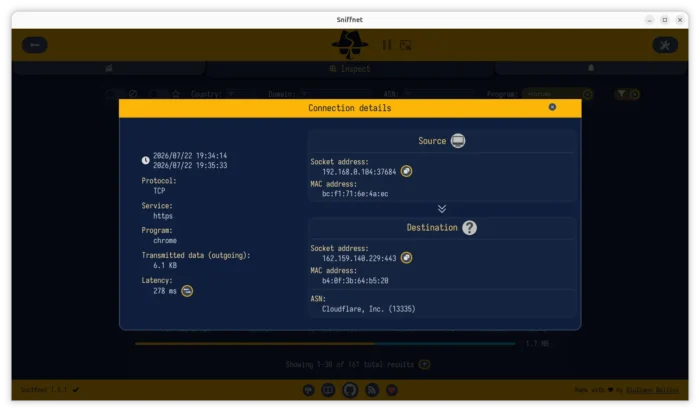
Without the requirement of running ping command from terminal, the new version now displays Latency row in the connection details page.
To avoid extra traffic for every captured connection, user needs to do a single click on the button to measure the latency from local computer to the destination IP. And, it will cache the result for per remote IP while the app is running.
This version also improved the IP blacklists import by adding CIDR ranges support. Previously, it only supports exact IPv4/IPv6 addresses, such as 8.8.8.8 and 2001:db8::1.
Now, CIDR ranges that represent a block of IP addresses are also support. Meaning you can import IP blacklists contain something look like 1.2.3.0/24 that represents IP from 1.2.3.0 to 1.2.3.255, and 2001:db8::/32 for all IPv6 addresses whose first 32 bits are 2001:0db8.
And, it improved the import feedback by showing status details such as no blacklist file selected, file read error, no valid IP/CIDR entries found, and successful load with parsed entry counts.
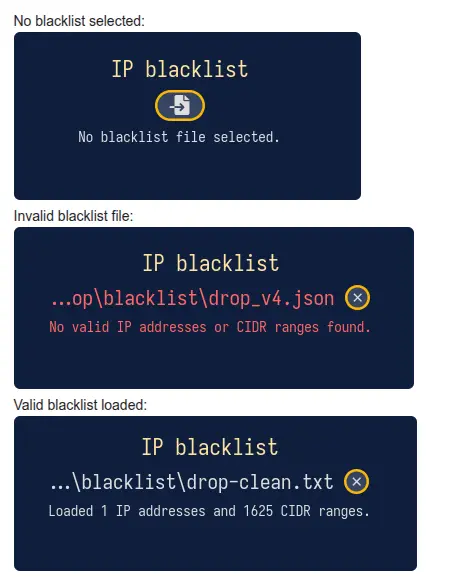
image from https://github.com/GyulyVGC/sniffnet/issues/845
For Linux, Sniffnet 1.5.1 added some keywords to the .desktop entry, so user can find out the app icons by also searching with traffic, inspect, monitor, internet, or network.
It as well added back old Linux Distributions support, such as Ubuntu 22.04, Fedora 39, by removing the requirement of glibc 2.39 in the pre-build RPM, DEB, AppImage packages, and, fixed broken X-AppImage-Version entry in sniffnet.desktop for AppImage package.
Other changes include:
- Reverse DNS resolution runs on a single dedicated thread.
- Dim inactive items in Thumbnail mode when favorite filters enabled.
- New Hungarian and Sinhala translations.
Get Sniffnet 1.5.1
More changes about the release as well as installer packages for Linux, Windows, and macOS are available in Github via the link below:
For Linux, either select download the AppImage and run it (after adding executable permission) to launch the internet monitor, though it requires to be run as root due to permission issue.
Or choose install DEB package for Debian/Ubuntu, RPM package for RHEL/Fedora based Linux Distributions.