
After two weeks of development, Firefox web browser version 161.0 is now available to download.
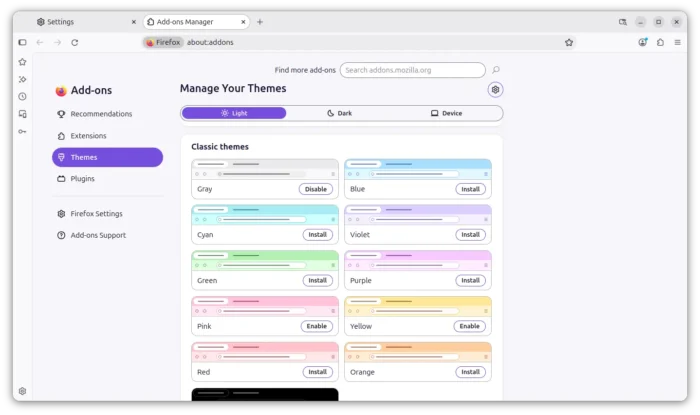
The new version adds the classic Proton theme that can restore the classic gray color palette and remove gradients in the new default “Nova” UI theme.
Just go to Settings -> Extensions and Themes, then you can install and enable the Proton theme (Gray) under “Classic themes” section. While, a selection of solid-colored themes and OLED Black theme are also available for choices.
For user who has a Mozilla account, the built-in VPN has been updated with option to turn on or off the feature for specific websites.
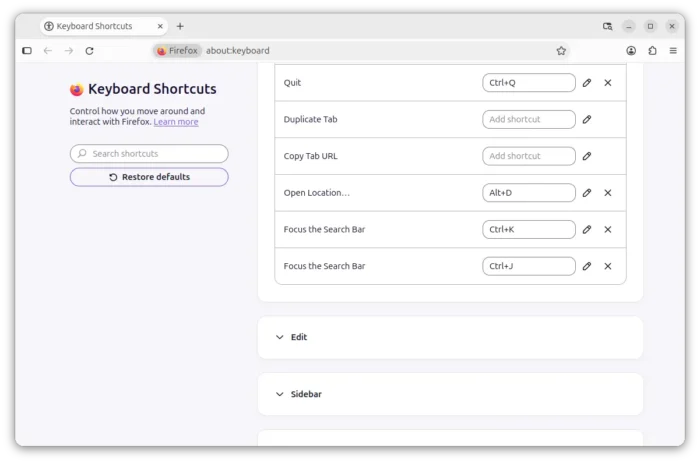
And, when you want to copy the URL of the current tab, you don’t have to highlight the address bar, right-click and choose copy, simply press a key combination on your keyboard can do the trick.
Simply go to about:keyboard page, assign a key combination for “Copy Tab URL“. Then, you can use the shortcut key at any time to quickly copy the current URL in Firefox to clipboard.
Since Firefox now has a two-week release cycle, each release tends to include fewer new features.
Besides the new themes and keyboard shortcut support, keyboard shortcuts assigned to Firefox menu items in System Settings now override the built-in shortcuts for those items in macOS.
And, browsing history imported from Chrome now includes how often you visited each page, so the sites you visit most often rank higher in address bar suggestions and shortcuts.
Firefox 161.0 also includes various security and other fixes, as well as the following changes for developers:
- Add support the
random()CSS function. - Add supports nested arbitrary substitution functions in the primary parameters of
var(),attr(), andenv(). - Supports the CSS Typed Object Model.
- Supports web custom formats in the Async Clipboard API.
Get Firefox 161.0
The official release note as well as the download link will be soon available in Firefox website via the link below:
If you can’t wait, then go to this Mozilla page for the source and installers for Windows, macOS, and Linux.