PPA Updated with Krita 6.0.4 / Krita 5.3.4 for Ubuntu 26.04 | 24.04

Published: September 24, 2026 — Last updated: October 9, 2026 — 4 Comments

For those who want to install the most recent Krita 6.0.4 (or Krita 5.3.4) in native .deb package, I’ve updated the PPA for Ubuntu 26.04 and Ubuntu 24.04 LTS.

Krita, KDE’s digital painting software, is now at version 5.3.x and 6.0.x release series. They are almost functionally identical; one is built with Qt 5, while the other is built with Qt 6.
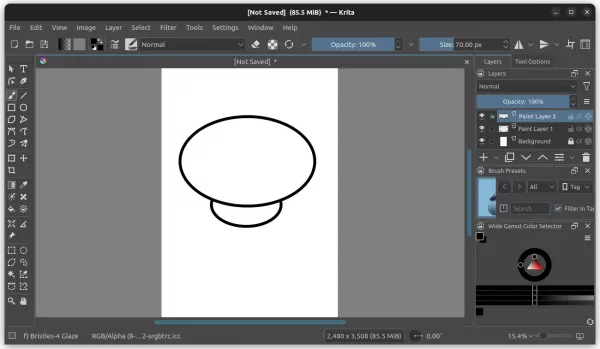
Besides the major Qt version differences, both Krita 5.3 and 6.0 release series, feature completely overhauled the text tool with on-canvas edit, ability to make auto wrapped text, text in shape, and text on path, and new Type Setting Mode.

Both versions as well introduced new knife tool (Comic Panel Editing tool) to cut through a shape with a gap width, Radiance RGBE (.hdr) files, CSS palette, Python Painting API, and many other features. See the release note for details.

Install Krita 6.0.4 / Krita 5.3.4 via DEB package

Krita now provides official Linux package through AppImage which is available to download in its website.

Just grab the package, add executable permission, then you can run it to launch the software.
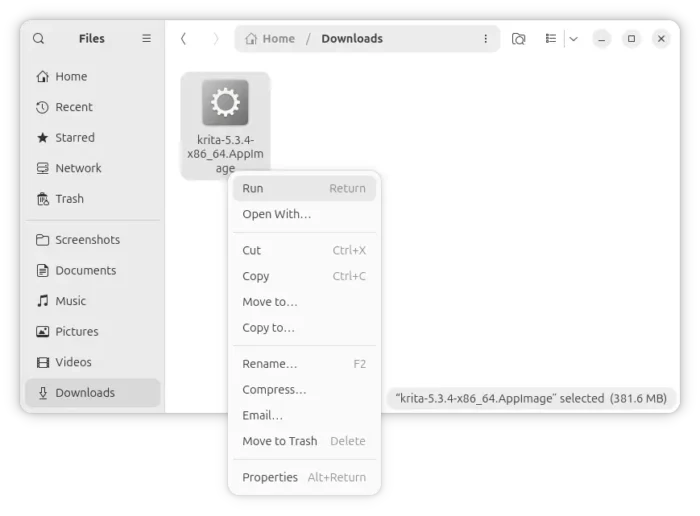
Krita AppImage

For those who prefer the native .deb package, I’ve built the new versions into this unofficial PPA (6.0.4 for Ubuntu 26.04, 5.3.4 for Ubuntu 24.04). Ubuntu 22.04 is sadly no longer supported due to Qt5 version mis-match.

And, both amd64/amd64v3 (Intel/AMD) and arm64/armhf (Snapdragon X Elite) platforms are supported.

To add the PPA and install Krita, press Ctrl+Alt+T on keyboard to launch terminal and run the commands below one by one:

sudo add-apt-repository ppa:ubuntuhandbook1/krita
sudo apt update
sudo apt install krita

UPDATE: For Ubuntu 26.04 users who prefer the qt5 build (v5.3.4), use this PPA instead:

sudo add-apt-repository ppa:ubuntuhandbook1/krita-qt5
sudo apt update
sudo apt install krita qml-module-qtquick-layouts qml-module-qtquick-window2

The package version is “2:5.3.4-0build1~ubuntu26.04” that’s higher than the Ubuntu provided “1:6.0.1~ufsg-0ubuntu2“. If it won’t install, try replacing the last command with:

sudo apt install -t "o=LP-PPA-ubuntuhandbook1-krita-qt5" krita qml-module-qtquick-layouts qml-module-qtquick-window2

Uninstall:

To remove the PPA, use command in terminal (Ctrl+Alt+T):

sudo add-apt-repository --remove ppa:ubuntuhandbook1/krita

Also run sudo apt update to refresh cache, though the last command should do it automatically.

And, to uninstall the Krita deb package, run command:

sudo apt remove krita krita-data

I'm a freelance blogger who started using Ubuntu in 2007 and wishes to share my experiences and some useful tips with Ubuntu beginners and lovers. Please comment to let me know if the tutorial is outdated! And, notify me if you find any typo/grammar/language mistakes. English is not my native language. Buy me a coffee: https://ko-fi.com/ubuntuhandbook1 |

4 responses to PPA Updated with Krita 6.0.4 / Krita 5.3.4 for Ubuntu 26.04 | 24.04

  1. i wish it was possible to build krita 5 for resolute 26.04 and neatly package both.
    eg: 1:5.3.4-0build1~ubuntu2604

    krita 6 is default in resolute but it was giving me UX issues with its tools.

    where i use the official website stable appimage for krita5 with no issues
    maybe they’ll fix the issues in krita6
    “We consider Krita 5.3.4 suitable for productive work; 6.0.4 is, because of the many changes from Qt5 to Qt6 more experimental.” — krita website

    • The qt5 build (v5.3.4) for Ubuntu 26.04:

      https://launchpad.net/~ubuntuhandbook1/+archive/ubuntu/krita-qt5

      Don’t know why, but the package miss a few QML modules. Run the commands below to install them after added the PPA:

      sudo apt install krita qml-module-qtquick-layouts qml-module-qtquick-window2
      • oh nice. ill have a test to see how it all works out
        always a +plus+ when i dont have to go manually download an update
        (could write a script myself, but thats not an apt update!)

        also good idea for 2:5.3.4 versioning to override ubuntu defaults
        i didnt know how that worked.

  2. average_krita_tester October 9, 2026 at 5:12 am

    yes can confirm those are not auto installed and krita5 complains:

    —
    sudo apt install qml-module-qtquick-layouts:

    qrc:/TextProperties.qml:8:1: module “QtQuick.Layouts” is not installed
    import QtQuick.Layouts 1.12
    ^
    Errors in “Text Properties” : (qrc:/TextProperties.qml:8:1: module “QtQuick.Layouts” is not installed
    import QtQuick.Layouts 1.12
    ^)

    —
    sudo apt install qml-module-qtquick-window2:

    qrc:/TextProperties.qml:26:5: Type Kis.WindowFocusChecker unavailable
    Kis.WindowFocusChecker {
    ^
    file:///usr/lib/x86_64-linux-gnu/qt5/qml/org/krita/components/WindowFocusChecker.qml:7:1: module “QtQuick.Window” is not installed

    ^
    Errors in “Text Properties” : (qrc:/TextProperties.qml:26:5: Type Kis.WindowFocusChecker unavailable
    Kis.WindowFocusChecker {
    ^, file:///usr/lib/x86_64-linux-gnu/qt5/qml/org/krita/components/WindowFocusChecker.qml:7:1: module “QtQuick.Window” is not installed

    ^)

    —
    that fixes both

Leave a Reply

Text formatting is available via select HTML.

<a href="" title=""> <abbr title=""> <acronym title=""> <b> <blockquote cite=""> <cite> <code> <del datetime=""> <em> <i> <q cite=""> <s> <strike> <strong> 

*