Firefox 151.0, the new monthly release of the free open-source web browser, is available to download now!
The new version introduced more security features, redesigned the layout of the home (new tab) page, and added more PDF editing features.
First, the new version has a new layout for the home and new tab pages, designed for upcoming new features that will be available in the next 152 release. It as well added some new wallpapers for the “New Tab” page, which are available via the pencil icon in the lower right.
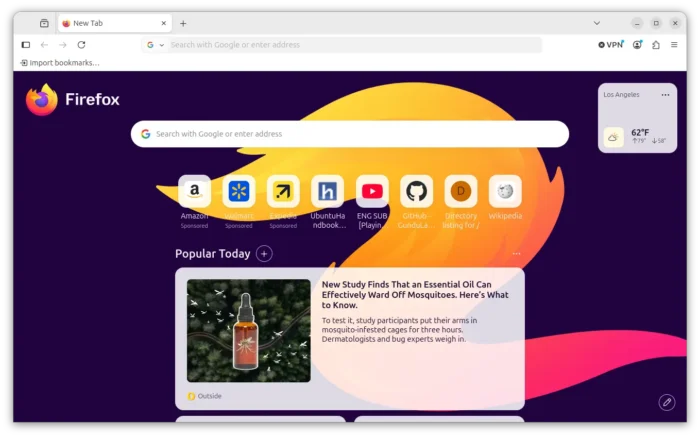
Firefox 151 New Home Page
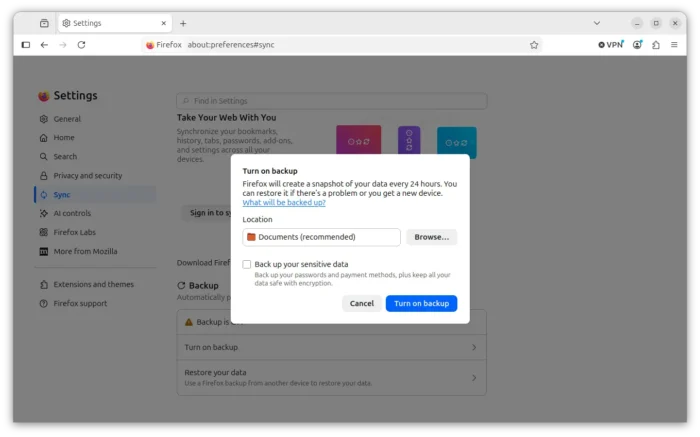
For Linux, the auto-backup feature that was previously for Windows only, now is available in Settings -> Sync page.
With it enabled, it will automatically backup your browsing data, such as bookmarks, settings, extensions, or passwords, every day and save them into local files.
The sensitive data is encrypted and protected via a password. And, you may use these backup files to restore your Firefox to where you left off.
The new Firefox 151.0 also improved the security. The Private Browsing mode now allows to instantly clear all data from your current session without closing the entire window.
It enhanced the fingerprinting by limiting the amount of information revealed about your device and browser, making it harder for websites to track you across sites. And, it enabled local network access restrictions to all users, so websites need to request permission before being able to connect to devices on your local network.
For macOS, it now uses native menu for drop-down menus on web pages, correctly pastes URLs copied from iOS devices using Apple Universal Clipboard. And, it improved color management for copied and pasted images, and fixed maximized browser windows could reopen on the wrong monitor after relaunching.
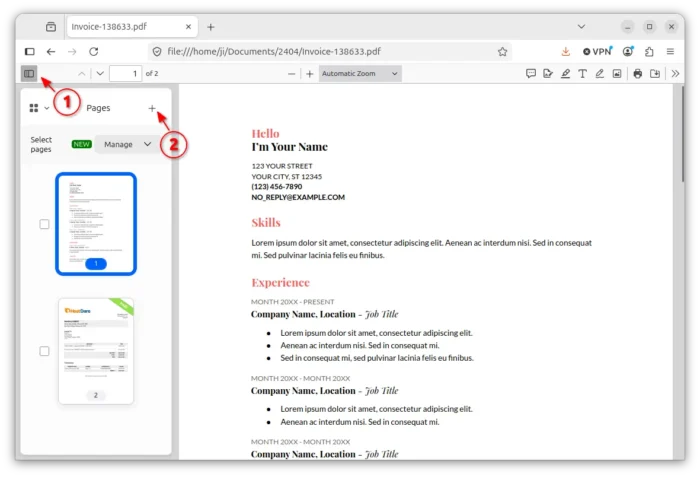
The built-in PDF viewer can now merge multiple PDFs into single. Simply drag’n’drop your PDF file into browser window, then click the left side “Manage pages” icon to show the side-bar, next click “+” to add new PDFs, drag’n’drag to re-arrange them, and finally press Ctrl+S to export.
Other changes in Firefox 151.0 include:
- Add Translations page (about:translations) to More Tools menu.
- Enable Address Autofill for Netherlands users.
- Respect user’s location permission setting in Windows.
- Various security fixes.
For developers, this version also added Document Picture-in-Picture API to allows web pages to place content in an always-on-top popup, Web Serial API to manage microcontrollers that support serial communications, and more!
Get Firefox 151.0
The official release note as well as the download link for the new version will be soon available via the link below:
For choice, you may get the packages in Mozilla website via this page.