Archives For News

Free open-source software updates and Linux news

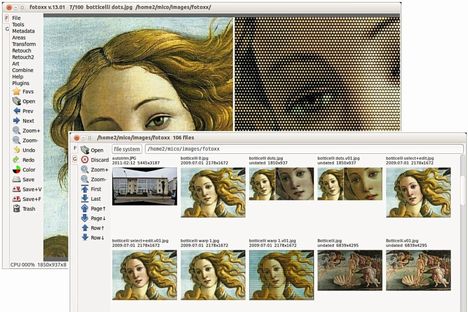
As you may know, Fotoxx is a free open source Linux program for photo editing and collection management. The goal is to meet most user needs while remaining fast and easy to use. The latest Fotoxx 13.10 has been released with many improvements and bug fixes. See details:

  • Mashup images and text can be moved, resized and rotated using the mouse.
  • Trim/Crop and Rotate were combined as one function to improve workflow.
  • Rotate: click image position to add vertical and horizontal guidelines.
  • Rotate: the automatic trim option was reinstated.
  • Flatten and Expand brightness distribution were combined as one function.
  • Paint/Clone: new option to paint/erase gradually or fully in one stroke.
  • Gallery thumbnail popup menu: rotate +/-90 degrees was added.
  • Gallery [Top] button: new option to choose from named collections.
  • World map zoom: toggle full-size/fit-window without intermediate steps.
  • Slide Show: allow pause and resume at a selected image position.
  • Slide Show: an image with the tag ‘pause’ will beep and pause until resumed.
  • View Metadata: option to show only captions and comments (e.g. for slide show).
  • Making a named collection from search results (or any gallery) was simplified.
  • CMYK function: the user interface was simplified.
  • Warp Linear/Curved/Affine are using multiple threads for faster response.
  • Bugfix: clickable tabular reports would not scroll with the mouse wheel.
  • Bugfix: the interactive translation update function was broken.

fotoxx 13.10

Download Fotoxx at its official website.

Before get started installing the package, you need to first install dcraw & ufraw in Ubuntu Software Center.

rsync-logo

Rsync 3.1.0 has been finally announced on September 28th, since the last Rsync 3.0.9 was released two years ago.

This is a feature release that improves performance, provides several new options, and fixes a few bugs along the way.

What’s new in Rsync 3.1.0:

OUTPUT CHANGES:

  • Output numbers in 3-digit groups by default (e.g. 1,234,567). See the --human-readable option for a way to turn it off. See also the daemon’s “log format” parameter and related command-line options (including --out-format) for a modifier that can be used to request digit-grouping or human-readable output in log escapes. (Note that log output is unchanged by default.)
  • The --list-only option is now affected by the --human-readable setting. It will display digit groupings by default, and unit suffixes if higher levels of readability are requested. Also, the column width for the size output has increased from 11 to 14 characters when human readability is enabled. Use --no-h to get the old-style output and column size.
  • The output of the --progress option has changed: the string “xfer” was shortened to “xfr”, and the string “to-check” was shortened to “to-chk”, both designed to make room for the (by default) wider display of file size numbers without making the total line-length longer. Also, when incremental recursion is enabled, the string “ir-chk” will be used instead of “to-chk” up until the incremental-recursion scan is done, letting you know that the value to check and the total value will still be increasing as new files are found.
  • Enhanced the --stats output: 1) to mention how many files were created (protocol >= 28), 2) to mention how many files were deleted (a new line for protocol 31, but only output when --delete is in effect), and 3) to follow the file-count, created-count, and deleted-count with a subcount list that shows the counts by type. The wording of the transferred count has also changed so that it is clearer that it is only a count of regular files.

BUG FIXES:

  • Fixed a bug in the iconv code when EINVAL or EILSEQ is returned with a full output buffer.
  • Fixed some rare bugs in --iconv processing that might cause a multibyte character to get translated incorrectly.
  • Fixed a bogus “vanished file” error if some files were specified with “./” prefixes and others were not.
  • Fixed a bug in --sparse where an extra gap could get inserted after a partial write.
  • Changed the way --progress overwrites its prior output in order to make it nearly impossible for the progress to get overwritten by an error.
  • Improved the propagation of abnormal-exit error messages. This should help the client side to receive errors from the server when it is exiting abnormally, and should also avoid dying with an “connection unexpectedly closed” exit when the closed connection is really expected.
  • The sender now checks each file it plans to remove to ensure that it hasn’t changed from the first stat’s info. This helps to avoid losing file data when the user is not using the option in a safe manner.
  • Fixed a data-duplication bug in the compress option that made compression less efficient. This improves protocol 31 onward, while behaving in a compatible (buggy) manner with older rsync protocols.
  • When creating a temp-file, rsync is now a bit smarter about it dot-char choices, which can fix a problem on OS X with names that start with “..”.
  • Rsync now sets a cleanup flag for --inplace and --append transfers that will flush the write buffer if the transfer aborts. This ensures that more received data gets written out to the disk on an aborted transfer (which is quite helpful on a slow, flaky connection).
  • The reads that map_ptr() now does are aligned on 1K boundaries. This helps some filesystems and/or files that don’t like unaligned reads.
  • Fix an issue in the msleep() function if time jumps backwards.
  • Fix daemon-server module-name splitting bug where an arg would get split even if --protect-args was used.

ENHANCEMENTS:

  • Added the --remote-option=OPT (-M OPT) command-line option that is useful for things like sending a remote --log-file=FILE or --fake-super option.
  • Added the --info=FLAGS and --debug=FLAGS options to allow finer-grained control over what is output. Added an extra type of --progress output using --info=progress2.
  • The --msgs2stderr option can help with debugging rsync by allowing the debug messages to get output to stderr rather than travel via the socket protocol.
  • Added the --delete-missing-args and --ignore-missing-args options to either delete or ignore user-specified files on the receiver that are missing on the sender (normally the absence of user-specified files generates an error).
  • Added a “T” (terabyte) category to the --human-readable size suffixes.
  • Added the --usermap/--groupmap/--chown options for manipulating file ownership during the copy.
  • Added the “%C” escape to the log-output handling, which will output the MD5 checksum of any transferred file, or all files if --checksum was specified (when protocol 30 or above is in effect).
  • Added the “reverse lookup” parameter to the rsync daemon config file to allow reverse-DNS lookups to be disabled.
  • Added a forward-DNS lookup for the daemon’s hosts allow/deny config. Can be disabled via “forward lookup” parameter (defaults to enabled).
  • Added a way for more than one group to be specified in the daemon’s config file, including a way to specify that you want all of the specified user’s groups without having to name them. Also changed the daemon to complain about an inability to set explicitly-specified uid/gid values, even when not run by a super-user.
  • The daemon now tries to send the user the error messages from the pre-xfer exec script when it fails.
  • Improved the use of alt-dest options into an existing hierarchy of files: If a match is found in an alt-dir, it takes precedence over an existing file. (We’ll need to wait for a future version before attribute-change on otherwise unchanged files are safe when using an existing hierarchy.)
  • Added per-user authorization options and group-authorization support to the daemon’s “auth users” parameter.
  • Added a way to reference environment variables in a daemon’s config file (using %VAR% references).
  • When replacing a non-dir with a symlink/hard-link/device/special-file, the update should now be done in an atomic manner.
  • Avoid re-sending xattr info for hard-linked files w/the same xattrs (protocol 31).
  • The backup code was improved to use better logic maintaining the backup directory hierarchy. Also, when a file is being backed up, rsync tries to hard-link it into place so that the upcoming replacement of the destination file will be atomic (for the normal, non-inplace logic).
  • Added the ability to synchronize nano-second modified times.
  • Added a few more default suffixes for the “dont compress” settings.
  • Added the checking of the RSYNC_PROTECT_ARGS environment variable to allow the default for the --protect-args command-line option to be overridden.
  • Added the --preallocate command-line option.
  • Allow --password-file=- to read the password from stdin (filename “-“).
  • Rsync now comes packaged with an rsync-ssl helper script that can be used to contact a remote rsync daemon using a piped-stunnel command. It also includes an stunnel config file to run the server side to support ssl daemon connections. See the packaging/lsb/rsync.spec file for one way to package the resulting files (Suggestions for how to make this even easier to install & use are welcomed.)
  • Improved the speed of some --inplace updates when there are lots of identical checksum blocks that end up being unusable.
  • Added the --outbuf=N|L|B option for choosing the output buffering.
  • Repeating the --fuzzy option now causes the code to look for fuzzy matches inside alt-dest directories too.
  • The --chmod option now supports numeric modes, e.g. --chmod=644,D755
  • Added some Solaris xattr code.
  • Made an rsync daemon (the listening process) exit with a 0 status when it was signaled to die. This helps launchd.
  • Improved the RSYNC_* environment variables for the pre-xfer exec script: when a daemon is sent multiple request args, they are now joined into a single return value (separated by spaces) so that the RSYNC_REQUEST environment variable is accurate for any “pre-xfer exec”. The values in RSYNC_ARG# vars are no longer truncated at the “.” arg (prior to the request dirs/files), so that all the requested values are also listed (separately) in RSYNC_ARG# variables.

EXTRAS:

  • Added an “instant-rsyncd” script to the support directory, which makes it easy to configure a simple rsync daemon in the current directory.
  • Added the “mapfrom” and “mapto” scripts to the support directory, which makes it easier to do user/group mapping in a local transfer based on passwd/group files from another machine.
  • There’s a new, improved version of the lsh script in the support dir: it’s written in perl and supports -u without resorting to using sudo (when run as root). The old shell version is now named lsh.sh.
  • There is a helper script named rsync-slash-strip in the support directory for anyone that wants to change the way rsync handles args with trailing slashes. (e.g. arg/ would get stripped to arg while arg/. would turn into arg/).

INTERNAL:

  • The I/O code was rewritten to be simpler and do bigger buffered reads over the socket. The I/O between the receiver and the generator was changed to be standard multiplexed-I/O (like that over the socket).
  • The sender tries to use any dead time while the generator is looking for files to transfer in order to do sender-side directory scanning in a more parallel manner.
  • A daemon can now inform a client about a daemon-configured timeout value so that the client can assist in the keep-alive activity (protocol 31).
  • The filter code received some refactoring to make it more extendible, to read better, and do better sanity checking.
  • Really big numbers are now output using our own big-num routine rather than casting them to a double and using a %.0f conversion.
  • The pool_alloc library has received some minor improvements in alignment handling.
  • Added init_stat_x() function to avoid duplication of acl/xattr init code.
  • The included zlib was upgraded from 1.2.3 to 1.2.8.
  • Rsync can now be compiled to use an unmodified zlib library instead of the tweaked one that is included with rsync. This will eventually become the default, at which point we’ll start the countdown to removing the included zlib. Until then, feel free to configure using: ./configure --with-included-zlib=no

DEVELOPER RELATED:

  • Added more conditional debug output.
  • Fixed some build issues for android and minix.

The source tar is available here: rsync-3.1.0.tar.gz (signature), with a tar file of the “patches” directory now released in a separate file: rsync-patches-3.1.0.tar.gz (signature), and the diffs from version 3.0.9 are available here: rsync-3.0.9-3.1.0.diffs.gz (signature).

Task-Coach_logo
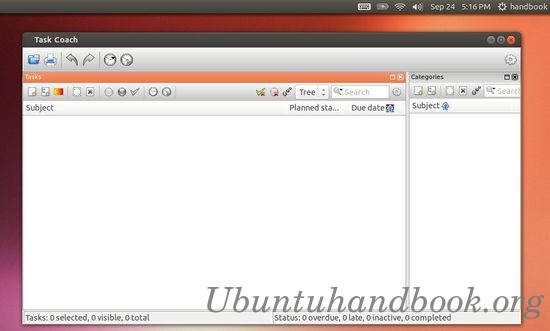
As you may know, Task Coach is a free flexible open source todo manager featuring hierarchical tasks. It grew out of frustration about other programs not handling composite tasks well. In addition to flexible composite tasks, Task Coach has grown to include prerequisites, prioritizing, effort tracking, category tags, budgets, notes, and many other features. However, users are not forced to use all these features; Task Coach can be as simple or complex as you need it to be.

Task Coach has reached 1.3.32 with lots of bug fixes. It has been added to Ubuntu 13.10 Saucy’s universe repository, so it can be easily installed via Ubuntu Software Center.

task coach ubuntu

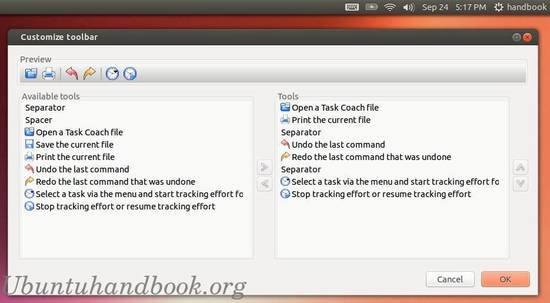
task coach customize toolbar

For Ubuntu 13.04 Raring and earlier version, deb package can be download at sourceforge.net

PAC manager 4.5.3 adds support for SOCKs proxies & Perl 5.18

Published: September 21, 2013 — Last updated: September 21, 2013

PAC Manager 4.5.3 has been released with bug fixes and improvements. This tutorial shows how to install / upgrade it in Ubuntu 13.04, Ubuntu 13.10, Ubuntu 12.04 and Linux Mint.

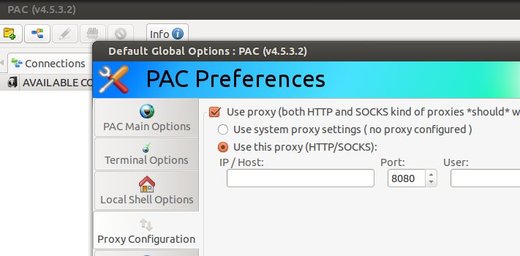
PAC Manager Socks proxy

As you may know, PAC is a Perl/GTK replacement for SecureCRT/Putty/etc. It provides a GUI to configure SSH/Telnet connections. The latest release 4.5.3 has following changes:

  • Added support for SOCKs proxies!
  • Added support for defining proxies configuration PER CONNECTION! :)
  • Added an option to “Auto save” every PAC change in realtime, without user interaction
  • Added preliminary date/time information on disconnections
  • Added support for Perl 5.18
  • Fixed a minor bug with PAC substitution variables
  • Changed PAC’s behaviour to prevent password from appearing on “ps” command for RDP (both rdesktop and xfreerdp commands)

Install PAC Manager 4.5.3:

Download the Deb and double-click to install via pop-up Ubuntu Software Center.

pac-4.5.3.2-all.deb

Or you can run below commands to install the downloaded package in terminal (Ctrl+Alt+T):

sudo dpkg -i ~/Downloads/pac-4.5.3.2-all.deb; sudo apt-get -f install

Enjoy!

Clementine 1.2 Gets Great New Features, Install it in Ubuntu

Published: September 16, 2013 — Last updated: October 15, 2013

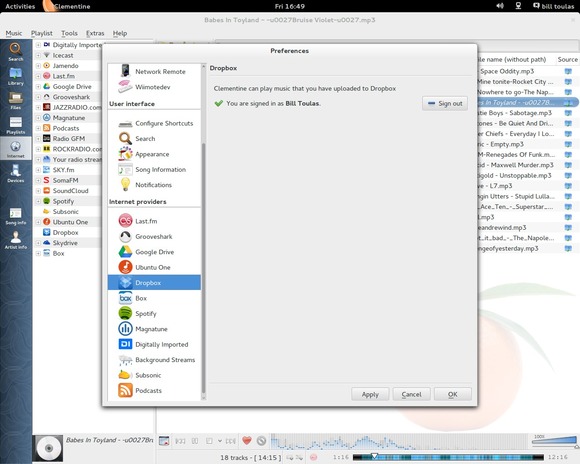
The Music Player Clementine 1.2 is coming with cloud services. It adds support for Subsonic, indexing & playing music from Box, Dropbox, Skydrive, and Ubuntu One. Add remote control support for Android and Playlist tab to the sidebar.

Clementine-1.2

As well as the above main features, Clementine 1.2 also contains below new features:

  • Add configurable blur & opacity to album art when used as a playlist background.
  • Support Opus where available.
  • Support .mka and .oga file extensions.
  • Parsing support for WPL playlists.
  • Sort providers by user preference.
  • Add year and bitrate to MPRIS2 messages.
  • Add “not equals” operator to fields in the smart playlist wizard.
  • Add an option to write ratings, play count and scores to files.
  • Add options to show the rating and score on the OSD.
  • Add support for POPM tags.
  • Add support for FMPS tags in Ogg, FLAC, MP4 and ASF files.
  • Compile the bundled Taglib with ASF, MP4 and Opus support.
  • Make it possible to cancel cover searches.
  • Add an option to resume playback on startup.
  • Add support for Performer and Grouping tags.
  • Add Radio GFM.
  • Add an Apply button to the settings dialog.
  • Make it possible to mark all episodes of a podcast as new/listened.
  • Add an option for fading in/out on pause/unpause.
  • Add stereo balance slider to the equalizer.
  • Add a –restart-or-previous commandline flag.
  • Allow files to be transcoded directly from the playlist.
  • Export downloaded album covers
  • see changelog

Although this is not officially 1.2 yet, it already works completely flawless Clementine 1.2 stable is out! Packages for Ubuntu 13.04, Ubuntu 12.04, Ubuntu 12.10, Debian wheezy, squeeze, Fedora, Windows are ready!

Download Clementine on Google Code

You can also add the Clementine PPA to get it on your Ubuntu system when it’s ready. Press Ctrl+Alt+T on your keyboard to open terminal. When it opens, run below commands one by one:

sudo add-apt-repository ppa:me-davidsansome/clementine
sudo apt-get update
sudo apt-get install clementine

Enjoy!

linux kernel logoThe Linux Kernel 3.10.11 has been released. All users of the 3.10 LTS kernel series are urged to upgrade as soon as possible. Here’s how to install or upgrade in Ubuntu 13.04, Ubuntu 12.10, Ubuntu 12.04 and Linux Mint.

This maintenance release introduces ARM, x86, and PowerPC fixes, as well as many updated drivers, including Nouveau, i915, iSCSI, and a few wireless ones. See the official announcement.

Install / Upgrade Kernel 3.10.11:

Press Ctrl+Alt+T on your keyboard to open terminal. When it opens, run below commands to download the DEBs.

for 32-bit system:

wget http://kernel.ubuntu.com/~kernel-ppa/mainline/v3.10.11-saucy/linux-headers-3.10.11-031011-generic_3.10.11-031011.201309080217_i386.deb

wget http://kernel.ubuntu.com/~kernel-ppa/mainline/v3.10.11-saucy/linux-headers-3.10.11-031011_3.10.11-031011.201309080217_all.deb

wget http://kernel.ubuntu.com/~kernel-ppa/mainline/v3.10.11-saucy/linux-image-3.10.11-031011-generic_3.10.11-031011.201309080217_i386.deb

for 64-bit system:

wget http://kernel.ubuntu.com/~kernel-ppa/mainline/v3.10.11-saucy/linux-headers-3.10.11-031011-generic_3.10.11-031011.201309080217_amd64.deb

wget http://kernel.ubuntu.com/~kernel-ppa/mainline/v3.10.11-saucy/linux-headers-3.10.11-031011_3.10.11-031011.201309080217_all.deb

wget http://kernel.ubuntu.com/~kernel-ppa/mainline/v3.10.11-saucy/linux-image-3.10.11-031011-generic_3.10.11-031011.201309080217_amd64.deb

Then install them via below command:

sudo dpkg -i linux-headers-3.10.11*.deb linux-image-3.10.11*.deb

If you’re not comfortable with command line. Download & install the Debs from the kernel ppa.

Audacious 3.4.1 Released, Install it in Ubuntu

Published: September 6, 2013

audacious logoThe Audacious music player has released version 3.4.1. It mainly fixed below bugs:

  • no gapless playing with ALSA output #314
  • .minipsf looks for .psflib one directory level up #316
  • Tray icon missing after restarting xfce4-panel #317
  • Neon plugin fails to play stream over proxy with authentication. # 319
  • Buffer size too small for HVSC songlengths db #326
  • no metadata display for opus files #329
  • metadata updating failed and other weird tag issues #332
  • file writer flac does not write tags #334
  • Fix skinned ui not being drawn properly with gtk-3 >= 3.9 #336

Install Audacious in Ubuntu:

The Webupd8 Team PPA has updated the packages for Ubuntu 13.10, Ubuntu 13.04, Ubuntu 12.10, Ubuntu 12.04 and their derivatives, such as Linux Mint and Elementary OS.

To install it, press Ctrl+Alt+T on your keyboard to open terminal. When it opens, run below command to add the ppa:

sudo add-apt-repository ppa:nilarimogard/webupd8

Then install / upgrade Audacious via:

sudo apt-get update; sudo apt-get install audacious audacious-plugins

That’s it. Enjoy!

The Choqok micro-blogging client has updated to version 1.4 which brings back the Twitter support. Identi.ca support has been removed from StatusNet plugin.

choqok 1.4

The developer announced in the official website:

Sometimes ago we had two bad news, Identi.ca service switched to pump.io software and dropped it’s API, so Choqok is no longer support Identi.ca service, but it still supports StatusNet websites, because StatusNet is not died. About Identi.ca support, right now there’s no one working on pump.io support as I know, so unfortunately there’s no promise on supporting it again.
And in Twitter land, they turned off support for API v1.0 which Choqok was using, and so with this update Twitter support is back to Choqok.

other changes:

  • Support for Twitter API v1.1 (Thanks to Daniel Kreuter for his effort on it)
  • “mark timeline as read” menu item added to tabs context menu (Lim Yuen Hoe)
  • Show “in reply to” in twitter search timelines (Lim Yuen Hoe)
  • Identi.ca support removed from StatusNet plugin, we still support StatusNet
  • And some other minor fixes

Install Choqok 1.4 in Ubuntu:

Press Ctrl+Alt+T on your keyboard to open terminal. When it opens, run below commands to install the client in Ubuntu 13.10, Ubuntu 13.04, Ubuntu 12.10, Ubuntu 12.04 and their derivatives.

sudo add-apt-repository ppa:adilson/experimental

sudo apt-get update

sudo apt-get install choqok

Linux Kernel 3.11 Released: Install / Upgrade it in Ubuntu 13.04/12.04

Published: September 3, 2013 — Last updated: September 3, 2013

linux kernel logoLinus Torvalds has announced the Linux Kernel 3.11. Here are the new features and how to install / upgrade new kernel in Ubuntu 13.04, Ubuntu 12.10, Ubuntu 12.04 and Linux Mint.

Linus Torvalds wrote on the mailing list:

As some people noticed, I got distracted (“Ooh, look, a squirrel..”)
and never wrote an announcement for -rc7. My bad. But it wasn’t
actually all that interesting a release apart from the date, and it
had a silly compile error in ohci-pci if you hadn’t enabled
CONFIG_PM_RUNTIME, so we’ll just forget -rc7 ever happened, ok?
Instead, go and get the real 3.11 release, which is out there, all
shiny and ready to be compiled and loved.

Since rc7 (ok, I lied, it happened) there’s been just small fixes.
Most of them came in from the networking tree, but there’s some all
over: some random filesystem fixes, a couple of sound fixes, a
/proc/timer_list fix, things like that. Nothing really stands out
(unless you happened to use the new soft-dirty code, that had a buglet
that could really hurt), but let’s hope we don’t have some silly
configuration that doesn’t even compile this time around.

Shortlog appended.

Linus

The Linux Kernel 3.11 Features:

Graphics:

  • The DRM driver changes dominate the Linux 3.11 kernel! The big feature is Radeon dynamic power management support has finally come to AMD’s open-source driver along with early support for the Radeon HD 8000 “Sea Islands” GPUs. Phoronix tests have shown Radeon DPM is successful at improving power use and lowering temperatures while delivering great performance.
  • There’s a new DRM display driver for the Renesas R-Car SoC.
  • Intel Haswell improvements and Valley View / Bay Trail support is now ready for Linux desktop usage.
  • H.264 / MPEG-2 video decoding for Nouveau with select NVIDIA GPUs bearing the VP2 engine as part of the PureVideo HD support. This is exposed in Gallium3D via the VDPAU state tracker. There’s also early GK110 GPU support. The NVIDIA GK110 is the firm’s latest high-end Kepler GPU.

Disk / File-System:

  • LZ4 compression support.
  • Zswap was merged for compressed swap caching.
  • Various XFS file-system improvements.
  • Performance tuning for Btrfs.
  • F2FS file-system updates.
  • EXT4 file-system updates.
  • The Lustre file-system client was merged for the first time.

CPU:

  • AVX2 Crypto optimizations.
  • PowerPC improvements from IBM.
  • Continued ARM improvements.
  • Xen and KVM virtualization now work for 64-bit ARM.

General Hardware & Miscellaneous Improvements:

  • Input device improvements.
  • Lots of audio / sound improvements.
  • With Linux 3.11, Wine can now handle Windows RT applications.

Download & Install Linux Kernel 3.11:

The Kernel PPA has updated DEB packages for Ubuntu and its derivatives. Press Ctrl+Alt+T on your keyboard to open terminal. When it opens, run below commands to download the DEBs.

for 32-bit system:

wget http://kernel.ubuntu.com/~kernel-ppa/mainline/v3.11-saucy/linux-headers-3.11.0-031100-generic_3.11.0-031100.201309021735_i386.deb

wget http://kernel.ubuntu.com/~kernel-ppa/mainline/v3.11-saucy/linux-headers-3.11.0-031100_3.11.0-031100.201309021735_all.deb

wget http://kernel.ubuntu.com/~kernel-ppa/mainline/v3.11-saucy/linux-image-3.11.0-031100-generic_3.11.0-031100.201309021735_i386.deb

for 64-bit system:

wget http://kernel.ubuntu.com/~kernel-ppa/mainline/v3.11-saucy/linux-headers-3.11.0-031100-generic_3.11.0-031100.201309021735_amd64.deb

wget http://kernel.ubuntu.com/~kernel-ppa/mainline/v3.11-saucy/linux-headers-3.11.0-031100_3.11.0-031100.201309021735_all.deb

wget http://kernel.ubuntu.com/~kernel-ppa/mainline/v3.11-saucy/linux-image-3.11.0-031100-generic_3.11.0-031100.201309021735_amd64.deb

For both 32-bit & 64-bit, run below command to install them:

sudo dpkg -i linux-headers-3.11.0*.deb linux-image-3.11.0*.deb

Once installed, restart your computer!

If you have problem with this kernel, run below command to remove it:

sudo apt-get purge linux-image-3.11.0*

Read More:

Linux Kernel 3.11 announcement

Kernel 3.11 on kernel ppa mainline

Fotoxx 13.09 Released: Install it via PPA in Ubuntu 13.04/12.04

Published: September 1, 2013 — Last updated: April 4, 2019

As you may know, the digital photo editor Fotoxx updates every month. Here I’ll show you how to install and keep the latest version in Ubuntu 13.04 Raring, Ubuntu 12.04 Precise and their derivatives via PPA.

So far, the latest release is 13.09. With it, you can edit photos and manage a large collection. Includes thumbnail image browser and navigator, RAW file import, a comprehensive set of edit functions working in deep color, fast full-image feedback, multiple undo/redo, select/copy/paste, file versioning, batch transforms, HDR and panorama composites, metadata edit, fast search and display, named image subsets (views). Read the changelog.

fotoxx ubuntu

Install Latest Fotoxx:

The getdeb repository provides Fotoxx packages for Ubuntu 12.04 and Ubuntu 13.04. You can add the repository by downloading and installing the Debs from the below link:

download gedeb package

After that, you can install fotoxx and receive updates by Synaptic Package Manager or by running below commands in terminal (Ctrl+Alt+T):

sudo apt-get update; sudo apt-get install fotoxx

For other Ubuntu editions, such as Ubuntu 13.10, Ubuntu 12.10, Ubuntu 10.04, etc. Download the deb packages from the official site.