Archives For News

Free open-source software updates and Linux news

Ubuntu 15.10 Wily Werewolf Alpha 1 Available for Download

Published: June 26, 2015 — Last updated: September 29, 2017

Ubuntu 15.10 Wily

The first alpha release of Ubuntu 15.10 Wily Werewolf was released a few hours ago, which features images for Kubuntu, Lubuntu, Ubuntu MATE, UbuntuKylin and the Ubuntu Cloud images.

Alpha 1 includes a number of software updates that are ready for wider testing. All releases are based on Linux Kernel 3.19.

  • Kubuntu 15.10 Alpha 1 features Plasma 5.3 desktop and KDE Applications 15.04.1.
  • LXQt is still in development, Lubuntu 15.10 Alpha 1 is set to be another bug fix release.
  • Ubuntu MATE 15.10 Alpha 1 features TLP for improved laptop battery endurance, xdg-utils support, more options in MATE Tweak tool, artwork updates, and some fixes.

For Ubuntu flavor developers and those who want to help in testing, reporting and fixing bugs, download Ubuntu 15.10 Alpha 1 from:

  • Kubuntu 15.10: http://cdimage.ubuntu.com/kubuntu/releases/wily/
  • Lubuntu 15.10: http://cdimage.ubuntu.com/lubuntu/releases/wily/
  • Ubuntu MATE 15.10: http://cdimage.ubuntu.com/ubuntu-mate/releases/wily/
  • UbuntuKylin 15.10: http://cdimage.ubuntu.com/ubuntukylin/releases/wily/
  • Ubuntu Cloud 15.10: http://cloud-images.ubuntu.com/releases/wily/

Ubuntu 15.10 release schedule:

  • Alpha 1 – June 25th
  • Alpha 2 – July 30th
  • Feature Freeze — August 20th
  • Beta 1 – August 27th
  • UI Freeze — September 10th
  • Beta 2 – September 24th
  • Kernel Freeze — October 15th
  • Release Candidate – October 15th
  • Ubuntu 15.10 Final – October 22nd

via: fridge.ubuntu.com

Ubuntu 15.04 Vivid Vervet (Final) Available for Download

Published: April 23, 2015 — Last updated: September 29, 2017

Ubuntu 15.04 Vivid

The final release of Ubuntu 15.04 Vivid Vervet and its flavors, e.g., Xubuntu 15.04, Lubuntu 15.04, Ubuntu Gnome 15.04, UbuntuKylin 15.04, Ubuntu MATE 15.04, Ubuntu Studio 15.04, and Kubuntu 15.04 are available for download now!

Ubuntu 15.04 will be supported for 9 months for Desktop, Server, and all its official flavors. It features:

  • Linux Kernel 3.19
  • Updated packages
  • systemd has replaced Upstart as the standard boot and service manager on all Ubuntu flavors except Touch.
  • Unity 7.3
  • Kubuntu 15.04 comes with Plasma 5 and KDE Applications 14.12 as the default
  • Gnome 3.14 for Ubuntu Gnome 15.04
  • Xfce 4.12 for Xubuntu 15.04

Download Ubuntu 15.04 and its flavors

Ubuntu 15.04 Desktop (Unity) and Sever:

http://releases.ubuntu.com/vivid/

Xubuntu 15.04, a lightweight Xfce Desktop based flavor:

http://cdimage.ubuntu.com/xubuntu/releases/15.04/

Lubuntu 15.04, based on the lightweight LXDE desktop environment:

http://cdimage.ubuntu.com/lubuntu/releases/15.04/

Ubuntu Gnome 15.04, based on Gnome-shell desktop environment:

http://cdimage.ubuntu.com/ubuntu-gnome/releases/15.04/

UbuntuKylin 15.04, an official flavor for Chinese users:

http://cdimage.ubuntu.com/ubuntukylin/releases/15.04/release/

Ubuntu MATE 15.04, a new official flavor based on MATE desktop, the continuation of classic GNOME 2:

http://cdimage.ubuntu.com/ubuntu-mate/releases/15.04/

Ubuntu Studio 15.04, for multimedia production:

http://cdimage.ubuntu.com/ubuntustudio/releases/15.04/

Kubuntu 15.04, based on KDE:

http://cdimage.ubuntu.com/kubuntu/releases/15.04/

For the official release note and how to upgrade instruction, refer to the Ubuntu wiki page.

HP Printer Drivers for Linux

HPLIP, an HP developed Linux solution for printing, scanning, and faxing with HP inkjet and laser printers, reached 3.15.4 release with new printers and most recent Linux Distros support.

According to the release note, Ubuntu 15.04 Beta, Debian 8.0 RC, Linux Mint 17.1 are supported in this release. Also below new printers are supported now:

  • HP Color LaserJet Pro M252dw
  • HP Color LaserJet Pro M252n
  • HP Color LaserJet Pro MFP M277n
  • HP Color LaserJet Pro MFP M277dw
  • HP Color LaserJet Enterprise M553n
  • HP Color LaserJet Enterprise M553dn
  • HP Color LaserJet Enterprise M553x
  • HP Color LaserJet Enterprise M553dh
  • HP Color LaserJet Enterprise M552dn
  • HP LaserJet Enterprise M604n
  • HP LaserJet Enterprise M604dn
  • HP LaserJet Enterprise M605dn
  • HP LaserJet Enterprise M605n
  • HP LaserJet Enterprise M605x
  • HP LaserJet Enterprise M606x
  • HP LaserJet Enterprise M606dn

There’s also a significant changes: HPLIP Plugin support for ARMv6,ARMv7 and aarch64 architectures. For more, see the release page.

Install HPLIP in Ubuntu/Linux Mint:

1. download HPLIP .run installer from:

Download HPLIP

2. Open terminal (Ctrl+Alt+T) and run command to give executable permission to the installer:

cd ~/Downloads/ && chmod +x hplip-*.run

3. Finally start the installer and follow the terminal prompts:

cd ~/Downloads/ && ./hplip-*.run

HPLIP on launchpad: https://launchpad.net/hplip

Elementary OS Freya

Elementary OS 0.3 Freya is out! The beautiful desktop Linux distribution is now based on Ubuntu 14.04 LTS, uses GTK+ 3.14 and supports UEFI.

After a few days of countdown in Elementary website, the developer team finally announced the release of Elementary OS 0.3 Freya, via a Live Youtube video. Here are some of the great new features in the Elementary OS 0.3:

  • Linux Kernel 3.16.
  • GTK+ 3.14, which will be default in Ubuntu 15.04 (Ubuntu 14.04 comes with GTK 3.10)
  • new, unified, app-focused design
  • Math calculations and Quicklist support in Application Launcher
  • Vala 0.26 and UEFI support.

See the video for more:

Download Elementary OS Freya:

Download Elementary OS Freya ISO

Nitrux Icon Theme 3.5 Brings Several New Software Icons

Published: April 6, 2015 — Last updated: April 6, 2015

blank-logo

Nitrux is a simple, clean and hand crafted icon set for GTK based environments (Gnome, Cinnamon, Mate, XFCE, LXDE), KDE (Plasma, Plasma 5) and Android.

This icon theme just got a new release a few hours ago which fixed misnamed Bygfoot icon, added back Synaptic package status icons, made icon for Star Wars: The Old Republic.

nitrux-icons-desktop

nitrux-folders

Nitrux 3.5.0 also adds some new icons for:

  • fault milestone one
  • Fading Hearts
  • Narcissu 1st & 2nd
  • Sakura Spirit
  • Serious Sam 3:BFE
  • garry’s mod
  • Team Fortress 2
  • Half-Life Blue Shift
  • Counter Strike-Condition-Zero
  • Ricochet
  • Opposing Force
  • Team Fortress
  • and several action icons for Plasma.

Install Nitrux Icon Theme:

First grab the latest .DEB binary (nitrux-icon-theme_x.x.x_all.deb) from link below:

Download Nitrux Icon DEB

For KDE user, download the below version instead:

Download Nitrux Icon for KDE

Then click open the .deb with Ubuntu Software Center and install the theme.

To apply the theme, you may use Unity Tweak Tool, Gnome Tweak Tool, Ubuntu Tweak, etc.

Firefox 37 Released with User Rating System [How-to-Upgrade]

Published: March 31, 2015 — Last updated: March 31, 2015

Mozilla Firefox 37

A new stable release of Mozilla’s web browser, Firefox 37, was released today at the end of March.

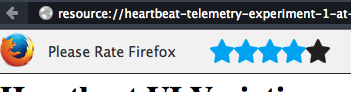
Heartbeatflow1According to the release note, Firefox 37 brings a heartbeat user rating system to get user feedback about Firefox. Every day a random subset of users are offered a rating widget. After rating Firefox, an ENGAGEMENT page may open in a background tab.

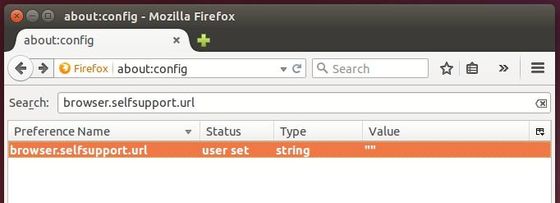
Users can disable this feature by going to about:config, search browser.selfsupport.url in filter box and set value to “”.

disable-rating

Besides that, Firefox 37 comes with below changes:

  • Yandex set as default search provider for the Turkish locale
  • Bing search now uses HTTPS for secure searching
  • Improved protection against site impersonation via OneCRL centralized certificate revocation
  • Opportunistically encrypt HTTP traffic where the server supports HTTP/2 AltSvc
  • Disabled insecure TLS version fallback for site security
  • Extended SSL error reporting for reporting non-certificate errors
  • TLS False Start optimization now requires a cipher suite using AEAD construction
  • Improved certificate and TLS communication security by removing support for DSA
  • Improved performance of WebGL rendering on Windows
  • Implemented a subset of the Media Source Extensions (MSE) API to allow native HTML5 playback on YouTube (Windows only)
  • Added support for CSS display:contents
  • IndexedDB now accessible from worker threads
  • New SDP/JSEP implementation in WebRT

See the release note for details.

How to upgrade Firefox in Ubuntu:

For Ubuntu 12.04 LTS, Ubuntu 14.04 LTS, and Ubuntu 14.10, Firefox 37 will be available for upgrade very soon through Ubuntu official repositories.

Once the official build of Firefox 37 is available, you can open Software Updater and install available updates after checking for updates.

Rhythmbox

The 3.2 release of Rhythmbox, Ubuntu’s default music player, was announced just a few hours ago with some new features, bug fixes and translation updates.

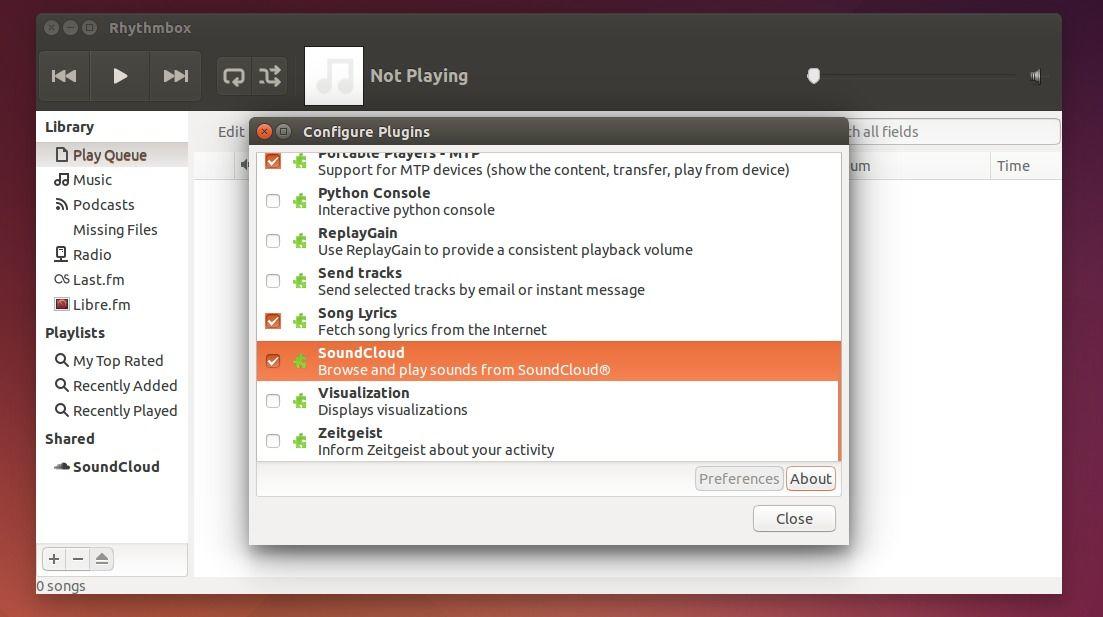
According the the changelog, Rhythmbox 3.2 brings a Soundcloud plugin, support for disc and track total tags, ability to clear, re-fetch and manually set cover art using the song info window.

rhythmbox-soundcloud-plugin

There are also some bugs has been fixed in the new release:

  • same songs played after reading a playlist
  • no easy way to unselect the browse by album,artist,genre option
  • Unclear string “in” for translation
  • rhythmbox skips one or two songs after playing certain songs
  • configure warning: ‘INCLUDES’ is the old name for ‘AM_CPPFLAGS’ (or ‘*_CPPFLAGS’)
  • Add track count and disc count to the database
  • data: Add Vorbis aliases as supported mime-types
  • Failure to build with tdb 1.3
  • Crash when right clicking the track list in the library
  • Rhythmbox fails to import MP3 files with ID3 v2.4 tags created by PicardQT
  • Tracks with no embedded covert art show a random cover art from the music collection
  • Right click on any file in ‘Tracks list’ clashes the application
  • Duplicate symbol _rb_metadata_iface_xml
  • gdkx.h explicitly included; prevents building on Mac
  • symbolic icon is broken

How to upgrade to Rhythmbox 3.2 in Ubuntu:

The new release is available in fossfreedom’s PPA, available for Ubuntu 14.04, Ubuntu 14.10, Ubuntu 15.04, and Linux Mint 17.

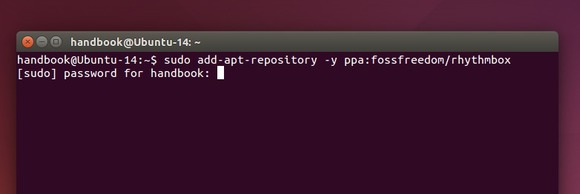
1. First open terminal by pressing Ctrl+Alt+T on keyboard. When it opens, run below command to add the PPA:

sudo add-apt-repository -y ppa:fossfreedom/rhythmbox

Add rhythmbox PPA

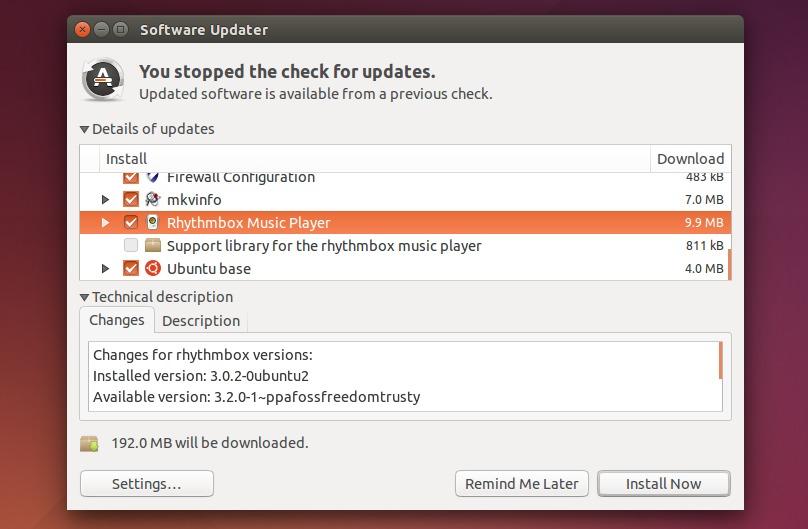
2. After adding the PPA, launch Software Updater (or Update Manager) and install available updates for Rhythmbox after checking for updates.

upgrade rhythmbox via software updater

Ubuntu 15.04 Final Beta Available for Download

Published: March 27, 2015 — Last updated: September 29, 2017

Ubuntu 15.04 Beta

The beta 2 release of Ubuntu 15.04 Desktop, Server, Cloud, and Core products was announced today, codenamed “Vivid Vervet”.

Ubuntu 15.04 comes with Linux Kernel 3.19. The default desktop Unity 7.3 brings many bug-fixes and locally integrated menus for unfocused windows. This release also ships Compiz Window Manager 0.9.12 with Nvidia fixes, fully MATE desktop support.

Before Ubuntu 15.04 final to be released on April 23, there will be also a RC release on April 16.

Download Ubuntu 15.04:

This beta release includes images from not only the Ubuntu Desktop, Server, Cloud, and Core products, but also the Kubuntu, Lubuntu, Ubuntu GNOME, Ubuntu Kylin, Ubuntu Studio, Xubuntu, and a new official flavor Ubuntu MATE.

Here are the download links for:

Ubuntu Desktop, Server, Cloud, Core: releases.ubuntu.com/vivid/

KUbuntu 15.04: cdimage.ubuntu.com/kubuntu/releases/vivid/

LUbuntu 15.04: cdimage.ubuntu.com/lubuntu/releases/vivid/

Ubuntu Gnome 15.04: cdimage.ubuntu.com/ubuntu-gnome/releases/vivid/

UbuntuKylin 15.04: cdimage.ubuntu.com/ubuntukylin/releases/vivid/

UbuntuStudio 15.04: cdimage.ubuntu.com/ubuntustudio/releases/vivid/

Xubuntu 15.04: cdimage.ubuntu.com/xubuntu/releases/vivid/

Ubuntu MATE 15.04: cdimage.ubuntu.com/ubuntu-mate/releases/vivid/

Ubuntu 15.04 Beta2 official release note is here.

Opera Browser for Linux

The latest stable Opera browser for Linux has reached the 28 release. The new release features bookmark synchronization on all devices.

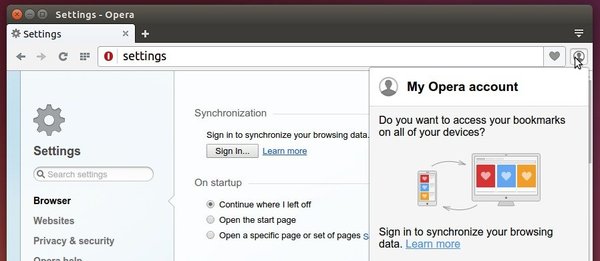
Opera team recently announced the bookmark syncing feature by releasing the Opera Stable 28, which is available on Opera for computers, Opera Mini for iOS and Opera for Android. To use this feature, you need an Opera Account and login from either Setting page or the little figure icon.

Opera Bookmark Sync

In addition, Opera 28 also brings:

  • a better integration with Mac OS, as “vibrancy” of the address field and improved Mac fullscreen mode have been added
  • a bundled themes selection has been updated
  • For more, see the changelog.

Install / Upgrade Opera in Ubuntu:

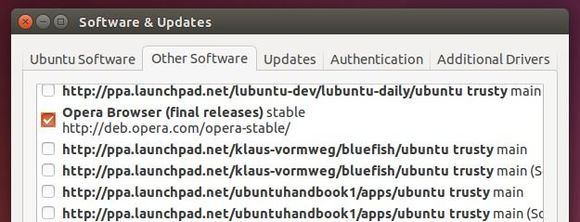
If you have an previous Opera release installed, the Opera Stable Repository should be added on your system. (Go to Software & Updates -> Other Software tab, and check it out)

Opera Linux repository

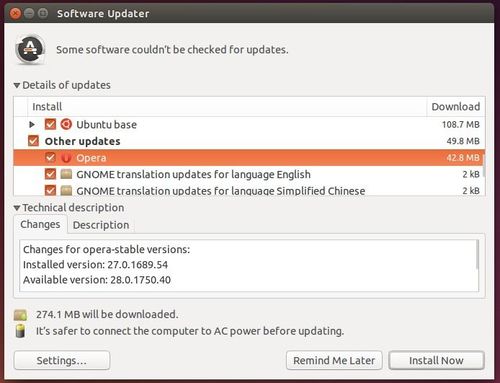
Then you can upgrade Opera through Software Updater after checking for updates.

upgrade-opera

Or you can download Opera browser directly from its Linux download page.

handbrake ubuntu 14.04

The open source video transcoder Handbrake 0.10.1 was released recently with various fixes. The developers are working on the next major release Handbrake 1.0.

In an attempt to move away from our yearly release cycle, we have decided to start publishing interim fix releases. 0.10.1 marks the first of these releases. It’s focus is to fix some common bugs rather than introduce the new features we are working on in the background for 1.0.

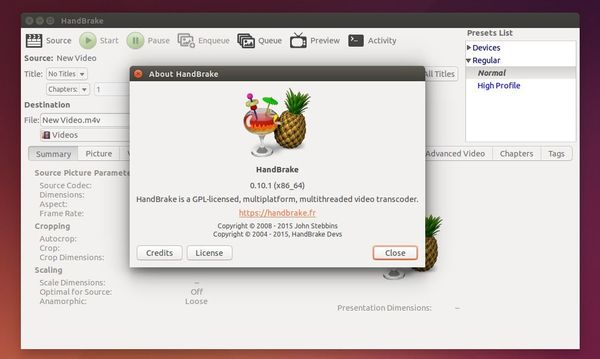
Handbrake 0.10.1 in Ubuntu 14.04

Release highlights in Handbrake 0.10.1:

  • Various bug fixes for all platforms and the core engine.
  • Updated x265 to 1.5 which brings numerous bug fixes and some performance improvements.

Install or Upgrade to Handbrake 0.10.1 in Ubuntu:

The developer has made the binaries into PPA, available for Ubuntu 14.04, Ubuntu 14.10, and/or Linux Mint 17/17.1.

To add the PPA, open terminal from the Dash or by pressing Ctrl+Alt+T on keyboard. When it opens, run:

sudo add-apt-repository ppa:stebbins/handbrake-releases

After that, upgrade Handbrake through Software Updater. Or install it by running below commands in terminal:

sudo apt-get update

sudo apt-get install handbrake-gtk