Calibre, the free and open source e-book computer software application suite has reached v1.6 with handy mark-book feature.
What’s New in Calibre 1.6:
- Temporary marking of books in the library
This allows you to select books from your calibre library manually and mark them. This ‘mark’ will remain until you restart calibre, or clear the marks. You can easily work with only the marked subset of books by right clicking the Mark Books button. To use this feature, go to Preferences->Toolbars and add the ‘Mark Books’ tool to the main toolbar. - Get Books: Add Wolne Lektury and Amazon (Canada) ebook stores
- DOCX Input: Handle hyperlinks in footnotes and endnotes
- Driver for Sunstech reader
- Allow using both uri: and url: identifiers to create two different arbitrary links instead of just one in the Book details panel
- E-book viewer: Make all keyboard shortcuts configurable
- Conversion: Add an option to not condense CSS rules for margin, padding, border, etc. Option is under the Look & Feel section of the conversion dialog.
- calibredb: Allow setting of title sort field
- ebook-meta: Add an –identifier option to set identifiers.
- Fix a locking error when composite columns containing formats are used and formats are added/deleted.
- EPUB Output: Do not strip <object> tags with type application/svg+xml in addition to those that use image/svg+xml.
- Cover grid: Fix selecting all books with Ctrl+A causing subsequent deselects to not fully work
- HTMLZ Output: Fix long titles causing error when converting on windows.
- Content server: Fix OPDS category links to composite columns
- E-book viewer: Fix regression that broke import/export of bookmarks
- E-book viewer: Use the default font size setting for the dictionary view as well.
- DOCX Input: Avoid using the value attribute for simple numbered lists, to silence the asinine epubcheck
- HTML Input: Images linked by the poster attribute of the <video> tag are now recognized and processed.
- DOCX Input: Fix erorr when converting docx files that have numbering defined with no associated character style.
- EPUB Metadata: Implementing updating identifiers other than isbn in the epub file from calibre when polishing or exporting the epub
- Amazon metadata download: Fix parsing of some dates on amazon.de
New news sources
- Various Uruguayan news sources by Carlos Alves
Improved news sources
- National Geographic Magazine
- New York Review of Books
- Focus (PL)
- Carta Capital
- AM 730
- Ming Pao (HK)
- Neu Osnabrucker Zeitung
Install / Upgrade Calibre:
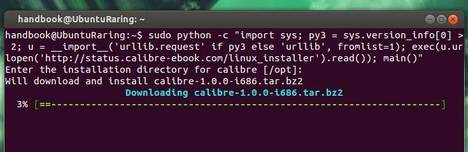
For Ubuntu 13.10, Ubuntu 13.04, Ubuntu 12.04, Ubuntu 12.10, Linux Mint users, press Ctrl+Alt+T on your keyboard to open terminal. When it opens, copy and paste below codes and hit enter to run:
sudo python -c "import sys; py3 = sys.version_info[0] > 2; u = __import__('urllib.request' if py3 else 'urllib', fromlist=1); exec(u.urlopen('http://status.calibre-ebook.com/linux_installer').read()); main()"
It automatically download the source code and install it on your system.